Get Started
This section builds on the SELAFIN (*.slf) geometry and the Conlim (*.cli) boundary condition files that result from the TELEMAC pre-processing tutorial. Both files can also be downloaded from the supplemental materials repository of this eBook:
Download qgismesh.slf (uses EPSG:32633 - ETRS 89 / UTM zone 33N).
Consider saving both files in a new folder, such as /steady2d-tutorial/ that will contain all model files.
Steering File (CAS)
The steering file has the file ending *.cas (presumably derived from the French word cas, which means case in English). The *.cas file is the main simulation file with information about references to the two always mandatory files (i.e., the SELAFIN *.slf geometry and the *.cli boundary files) and optional files, as well as definitions of simulation parameters. The steering file can be created or edited with a basic text editor or advanced GUI software such as Fudaa PrePro or BlueKenue. This tutorial uses a basic text editor (e.g., Notepad++ on Windows).
For this tutorial, create a new text file in the same folder where qgismesh.slf and boundaries.cli live, and name it, for instance, steady2d.cas (e.g., /steady2d-tutorial/steady2d.cas). The next sections guide through parameter definitions that stem from the Telemac2d manual. The final steering file can be downloaded from the supplemental materials repository (download steady2d.cas).
Overview of the CAS File
The below box shows the provided steady2d.cas file that can be used for running this tutorial.
Expand to view the complete .CAS file
/---------------------------------------------------------------------
/ TELEMAC2D
/ STEADY HYDRODYNAMICS TRAINING
/---------------------------------------------------------------------

/ steady2d.cas
/------------------------------------------------------------------/
/			COMPUTATION ENVIRONMENT
/------------------------------------------------------------------/
TITLE : '2d steady'
/
BOUNDARY CONDITIONS FILE : boundaries.cli
GEOMETRY FILE            : qgismesh.slf
RESULTS FILE           : r2dsteady.slf
/
MASS-BALANCE : YES / activates mass balance printouts - does not enforce mass balance
VARIABLES FOR GRAPHIC PRINTOUTS : U,V,B,H,S,Q,F / Q enables boundary flux equilibrium controls, B required for gaia (optional)
/
/------------------------------------------------------------------/
/			GENERAL PARAMETERS
/------------------------------------------------------------------/
TIME STEP : 1.
NUMBER OF TIME STEPS : 15000
GRAPHIC PRINTOUT PERIOD : 200
LISTING PRINTOUT PERIOD : 100
/
/------------------------------------------------------------------/
/			NUMERICAL PARAMETERS
/------------------------------------------------------------------/
/ General solver parameters
DISCRETIZATIONS IN SPACE : 11;11
FREE SURFACE GRADIENT COMPATIBILITY : 0.1  / default 1.
ADVECTION : YES
/
/ STABILITY CONTROLS
PRINTING CUMULATED FLOWRATES : YES
/
/ FINITE ELEMENT SCHEME PARAMETERS
/------------------------------------------------------------------
TREATMENT OF THE LINEAR SYSTEM : 2 / default is 2 - use 1 to avoid smoothened results
SCHEME FOR ADVECTION OF VELOCITIES : 14 / alternatively keep 1
SCHEME FOR ADVECTION OF TRACERS : 5
SCHEME FOR ADVECTION OF K-EPSILON : 14
IMPLICITATION FOR DEPTH : 0.55 / should be between 0.55 and 0.6
IMPLICITATION FOR VELOCITY : 0.55 / should be between 0.55 and 0.6
IMPLICITATION FOR DIFFUSION OF VELOCITY : 1. / v8p4 default
IMPLICITATION COEFFICIENT OF TRACERS : 0.6 / v8p4 default
MASS-LUMPING ON H : 1.
MASS-LUMPING ON VELOCITY : 1.
MASS-LUMPING ON TRACERS : 1.
SUPG OPTION : 0;0;2;2 / classic supg for U and V
/
/ SOLVER
/------------------------------------------------------------------
INFORMATION ABOUT SOLVER : YES
SOLVER : 1
MAXIMUM NUMBER OF ITERATIONS FOR SOLVER : 200 / maximum number of iterations when solving the propagation step
MAXIMUM NUMBER OF ITERATIONS FOR DIFFUSION OF TRACERS : 60 / tracer diffusion
MAXIMUM NUMBER OF ITERATIONS FOR K AND EPSILON : 50 / diffusion and source terms of k-e
/
/ TIDAL FLATS
TIDAL FLATS : YES
CONTINUITY CORRECTION : YES / default is NO
OPTION FOR THE TREATMENT OF TIDAL FLATS : 1
TREATMENT OF NEGATIVE DEPTHS : 2 / value 2 or 3 is required with tidal flats - default is 1
/
/ MATRIX HANDLING
MATRIX STORAGE : 3 / default is 3
/
/ BOUNDARY CONDITIONS
/------------------------------------------------------------------
/
/ Liquid boundaries
PRESCRIBED FLOWRATES  : 35.; 0.
PRESCRIBED ELEVATIONS : 374.80565;371.33
/
/ Type of velocity profile can be 1-constant normal profile (default) 2-UBOR and VBOR in the boundary conditions file (cli) 3-vector in UBOR in the boundary conditions file (cli) 4-vector is proportional to the root (water depth, only for Q) 5-vector is proportional to the root (virtual water depth), the virtual water depth is obtained from a lower point at the boundary condition (only for Q)
VELOCITY PROFILES : 4;1
/
/ Friction at the bed
LAW OF BOTTOM FRICTION : 4 / 4-Manning
FRICTION COEFFICIENT : 0.03 / Roughness coefficient
/ Friction at the boundaries
LAW OF FRICTION ON LATERAL BOUNDARIES : 4 / 4-Manning
ROUGHNESS COEFFICIENT OF BOUNDARIES : 0.03 / Roughness coefficient
/
/ INITIAL CONDITIONS
/ ------------------------------------------------------------------
INITIAL CONDITIONS : 'ZERO DEPTH' / start with dry model conditions
/
/-------------------------------------------------------------------
/			TURBULENCE
/-------------------------------------------------------------------
/
DIFFUSION OF VELOCITY : YES / default is YES
TURBULENCE MODEL : 3
/
&ETAGeneral Parameters
The general parameters define the computation environment starting with a simulation title and the most important links to the two mandatory input files:
BOUNDARY CONDITIONS FILE : boundaries.cli- with a MED file, use a BND boundary fileGEOMETRY FILE : qgismesh.slf
The model output can be defined with the following keywords:
RESULTS FILE : r2dsteady.slf- can be either a MED file or an SLF fileVARIABLES FOR GRAPHIC PRINTOUTS(i.e., output parameters):U,V,H,S,Q,F, for streamwise (U: ) and lateral (V: ) velocities, water depth (H: ), water surface elevation (S: ), discharge/fluxes (Q: ), and Froude number (F: )Other variables of interest for tutorials in this eBook: bottom elevation
B(required for morphodynamics with Gaia, value of the type of bottom friction usedW(see below), and turbulent kinetic energyK(requires the use of the turbulence model).The full list of available output variables can be found in the Telemac2d reference manual, section 1.348 (page 92).
The velocities (U and V), the water depth (H), and the discharge (Q) are standard variables that should be used in every simulation. In particular, the discharge Q is required to check when (steady) s converge at the inflow and outflow boundaries. Moreover, discharge Q enables to trace integrated fluxes along any user-defined line in the model. The procedure for verifying and identify discharges is described in the discharge verification section in the post-processing.
The time variables (TIME STEP and NUMBER OF TIME STEPS) define the simulation length. The printout periods (GRAPHIC PRINTOUT PERIOD and LISTING PRINTOUT PERIOD) define the result output frequency. The smaller the printout period, the longer will take the simulation because writing results is a time-consuming process. The printout periods (frequencies) refer to a multiple of the TIME STEPS parameter and need to be a smaller number than the NUMBER OF TIME STEPS. Read more about timestep parameters in the Telemac2d manual in sections 5 and 12.4.2.
In addition, the MASS-BALANCE : YES setting will print out mass fluxes and errors in the computation region, which is an important parameter for verifying the plausibility of the model. Note that this keyword only enables mass balance printouts and does not enforce mass balance of the model, which must be achieved through a consistent model setup following this tutorial and the Telemac2d manual.
Expand to review the GENERAL PARAMETERS used in this tutorial
TITLE : '2d steady flow'
/
BOUNDARY CONDITIONS FILE : boundaries.cli
GEOMETRY FILE : qgismesh.slf
RESULTS FILE : r2dsteady.slf
/
MASS-BALANCE : YES / activates mass balance printouts - does not enforce mass balance
VARIABLES FOR GRAPHIC PRINTOUTS : U,V,H,S,Q,F / Q enables boundary flux equilibrium controls
/
TIME STEP : 1.
NUMBER OF TIME STEPS : 15000
GRAPHIC PRINTOUT PERIOD : 200
LISTING PRINTOUT PERIOD : 100
General Numerical Parameters
The following descriptions refer to section 7.1 in the Telemac2d manual.
Telemac2d comes with three solvers for approximating the depth-averaged Navier-Stokes equations (i.e., the Shallow water equations) Kundu & Cohen, 2008 (p. 262) that can be chosen by adding the EQUATIONS keyword to the *.cas file:
EQUATIONS : SAINT-VENANT FEis the default that makes Telemac2d use a Saint-Venant finite element method,EQUATIONS : SAINT-VENANT FVmakes Telemac2d use a Saint-Venant finite volume method, andEQUATIONS : BOUSSINESQmakes Telemac2d use the Boussinesq approximation, which assumes constant density (incrompressible fluid assumption) and is not to be confused with the Boussinesq hypothesis.
In addition, a type of discretization has to be specified with the DISCRETIZATIONS IN SPACE keyword, which is a list of five integer values. The five list elements define spatial discretization schemes for (1) velocity, (2) depth, (3) tracers, (4) turbulence, and (5) advection (Spalart-Allmaras), respectively. The minimum length of the keyword list is 2 (for velocity and depth) and all other elements are optional. The list elements may take the following values defining spatial discretization:
11(default) activates (linear) triangular discretization in space (i.e., 3-node triangles),12activates quasi-bubble discretization with 4-nodes, and13activates quadratic discretization with 6-nodes.
The Telemac2d manual recommend using the default value of DISCRETIZATIONS IN SPACE : 11;11 that assigns a linear discretization for velocity and water depth, which is computationally fast but potentially unstable. The option 12;11 may be used to reduce free surface instabilities or oscillations (e.g., along with steep bathymetry gradients). The option 13;11 increases the accuracy of results, the computing time, memory usage, and it is currently not available in Telemac2d.
In addition, the FREE SURFACE GRADIENT keyword can be defined for increasing the stability of a model. Its default value is 1.0, but it can be reduced close to zero to achieve stability. The developers propose a minimum value of 0., but more realistic results can be yielded by setting this keyword to slightly more than zero (e.g., 0.1). For instance, the following keyword combination may reduce surface instabilities (also referred to as wiggles or oscillations):
DISCRETIZATIONS IN SPACE : 12;11
FREE SURFACE GRADIENT : 0.1
By default Advection is activated through the keyword ADVECTION : YES and it can be deactivated for particular terms only:
ADVECTION OF H : NO / deactivates depth advection
ADVECTION OF U AND V : NO / deactivates velocity advection
ADVECTION OF K AND EPSILON : NO / deactivates turbulent energy and dissipation (k-e model) or Spalart-Allmaras advection
ADVECTION OF TRACERS : NO / deactivates tracer advection
The PROPAGATION keyword (default: YES) steers the simulation of propagation and related phenomena. For instance, disabling propagation (PROPAGATION : NO) will also disable Diffusion. The other way round, when propagation is enabled, Diffusion can be disabled separately. Read more about Diffusion in Telemac2d in the turbulence section.
Finite Elements
The following descriptions refer to section 7.2.1 in the Telemac2d manual.
Telemac2d uses finite elements for iterative solutions to the Shallow water equations. The TREATMENT OF THE LINEAR SYSTEM keyword enables replacing the original set of equations (option 1) involved in TELEMAC’s finite element solver with a generalized wave equation (option 2). The replacement (i.e., the use of the generalized wave equation) is set to default since v8p2 and decreases computation time, but smoothens the results. This default (TREATMENT OF THE LINEAR SYSTEM : 2) automatically activates mass lumping for depth and velocity, and implies explicit velocity diffusion.
Use SCHEME FOR ADVECTION in lieu of TYPE OF ADVECTION
The TYPE OF ADVECTION keyword is a list of four integers that define the advection schemes for (1) velocities (both and ), (2) water depth , (3) tracers, and (4) turbulence ( or ). The value provided for (2) depth is ignored since v6p0 and a list of two values is sufficient in the absence of (3) tracers and a specific (4) turbulence model. Thus, in lieu of TYPE OF ADVECTION, the SCHEME FOR ADVECTION OF VELOCITIES keyword should be used. The default is TYPE OF ADVECTION : 1;5;1;1 (where the 5 for water depth stems from an older Telemac2d version and does not trigger the PSI scheme). However, the Telemac2d manual indicate that the TYPE OF ADVECTION keyword will be deprecated in future releases.
The Telemac2d manual state that the following scalar SCHEME FOR ADVECTION keywords apply instead of the soon deprecated TYPE OF ADVECTION list:
SCHEME FOR ADVECTION OF VELOCITIES : 1 / default
SCHEME FOR ADVECTION OF TRACERS : 1 / default
SCHEME FOR ADVECTION OF K-EPSILON : 1 / default
The three SCHEME FOR ADVECTION scalar keywords may take the following values:
1sets a not mass-conservative method of characteristics (default for all),2sets a semi-implicit scheme and activates the Streamline Upwind Petrov Galerkin (SUPG) scheme (read more below),3,4,13, and14activate the so-called NERD scheme (these numbers activate different schemes in 3d only),5sets a mass-conservative PSI distributive scheme (do not use with tidal flats), and15sets the mass-conservative ERIA scheme that works with tidal flats.
Options 4 and 5 require that the CFL condition is smaller than 1.
Without any SCHEME FOR ADVECTION ... keyword, the SUPG OPTION (Streamline Upwind Petrov Galerkin) keyword defines if upwinding applies and what type of upwinding applies. The SUPG OPTION is a list of four integers, where every element may take one of the following values:
0disables upwinding,1enables upwinding with a classical SUPG scheme (recommended when the CFL condition is unknown), and2enables upwinding with a modified SUPG scheme, where upwinding equals the CFL condition (recommended when the CFL condition is small).
The default is SUPG OPTION : 2;2;2;2, where
the first list element refers to flow velocity (default
2),the second to water depth (default
2- set to0whenMATRIX STORAGE : 3),the third to tracers (default
2), andthe last (fourth) to the k-epsilon model (default
2).
Note that the SUPG OPTION keyword is not optional for many keyword combinations and this tutorial uses SUPG OPTION : 0;0;2;2.
Implicitation parameters (IMPLICITATION FOR DEPTH, IMPLICITATION FOR VELOCITIES, and IMPLICITATION FOR DIFFUSION OF VELOCITY) apply to the semi-implicit time discretization used in Telemac2d. To enable cross-version compatibility, implicitation parameters should be defined in the *.cas file. For DEPTH and VELOCITIES use values between 0.55 and 0.60 (default is 0.55 since v8p1); for IMPLICITATION FOR DIFFUSION OF VELOCITY use 1.0 (default).
The default TREATMENT OF THE LINEAR SYSTEM : 2 involves so-called mass lumping, which leads to a smoothening of results. Specific mass lumping keywords and values are required for the flux control option of the TREATMENT OF NEGATIVE DEPTHS keyword and the default value for the treatment of tidal flats. To this end, the mass lumping keywords should be defined as:
MASS-LUMPING ON H : 1.
MASS-LUMPING ON VELOCITY : 1.
MASS-LUMPING ON TRACERS : 1.
In addition, MASS-LUMPING FOR WEAK CHARACTERISTICS : 1. may be defined, which will make Telemac2d using weak characteristics (see below). The default value of any MASS-LUMPING ... keyword is 0. and the maximum value is 1., which makes mass matrices diagonal.
The OPTION OF CHARACTERISTICS keyword defines the method of characteristics that can take a strong (default of 1) or a weak (2) form. A weak form decreases Diffusion, is more conservative, and increases computation time. Telemac2d automatically switches from the default strong (1) to the weak (2) form when
the
TYPE OF ADVECTIONis set to1,any
SCHEME FOR ADVECTION ...is set to1, orany
SCHEME OPTION FOR ADVECTION OF ...is set to2.
None of these options should be used with tracers because they are not mass-conservative.
Finite Volumes
The finite volume method is mentioned here for completeness and detailed descriptions are available in section 7.2.2 of the Telemac2d manual, and the malpasset example (telemac/v9.0.0/examples/telemac2d/malpasset/). To activate the finite volume scheme use:
EQUATIONS : 'SAINT-VENANT FV' / the apostrophes are strictly needed hereThe finite volume method involves the definition of a scheme through the FINITE VOLUME SCHEME keyword that can take one of the following integer values:
0enables the Roe (1981) scheme,1is the default and enables the kinetic scheme Audusse et al., 2000,3enables the Zokagoa & Soulaïmani (2010) scheme that is incompatible with tidal flats,4enables the Tchamen & Kahawita (1998) scheme for modeling wetting and drying of a complex bathymetry,5enables the Harten Lax Leer-Contact (HLLC) scheme Toro, 2009, and6enables the Weighted Average Flux (WAF) Ata, 2012 scheme for which parallelism is currently not implemented.
The finite volume/elements schemes are (semi-) explicit and potentially subjected to instability. For this reason, a desired CFL condition and a variable timestep are recommended to be defined:
DESIRED COURANT NUMBER : 0.9
VARIABLE TIME-STEP : YES / default is NO
DURATION : 15000
The DURATION keyword is required to terminate the simulation.
The variable timestep will cause irregular listing outputs, while the graphic output frequency is written as a function of the above-defined TIME STEP. Note that this tutorial uses VARIABLE TIME-STEP : NO.
The FINITE VOLUME SCHEME TIME ORDER keyword defines the second-order time scheme, which is by default set to Euler explicit (1). Setting the time scheme order to 2 makes Telemac2d using the Newmark scheme where an integration coefficient may be used to change the integration parameter. Note that NEWMARK TIME INTEGRATION COEFFICIENT : 1 corresponds to Euler explicit. To implement these options in the steering file, use the following settings:
FINITE VOLUME SCHEME TIME ORDER : 2 / default is 1 - Euler explicit
NEWMARK TIME INTEGRATION COEFFICIENT : 0.5 / default is 0.5
However, other tutorials, and the Telemac forum recommend using the following scheme settings for finite volumes:
FINITE VOLUME SCHEME : 5 / HLLC
FINITE VOLUME SCHEME SPACE ORDER : 1
FINITE VOLUME SCHEME TIME ORDER : 1
Additional keyword recommendations for the finite volume scheme are the following:
OPTION FOR THE DIFFUSION OF VELOCITIES : 2 / only option to get mass conservation but can cause problems with tidal flats
SCHEME FOR ADVECTION OF VELOCITIES : 3 / use 3, also for FV - MATRIX STORAGE must be 3
SCHEME OPTION FOR ADVECTION OF VELOCITIES : 4 / overrides SUPG OPTION and OPTION FOR CHARACTERISTICS
NUMBER OF CORRECTIONS OF DISTRIBUTIVE SCHEMES : 2 / increase for higher accuracy and longer computing time, requires SCHEME OF ADVECTION 3,4,5, or 15 and OPTION 2,3,4
TYPE OF SOURCES : 2 / 2=Dirac is the only possibility for mass conservation, the default=1 means linear function and is not mass conservative
CONTINUITY CORRECTION : YES / particularly important when not only discharge but also depth is imposed at boundaries
Depending on the type of analysis, the solver-related parameters of SOLVER, SOLVER OPTIONS, MAXIMUM NUMBER OF ITERATION FOR SOLVER, and TIDAL FLATS may also be modified. Specifically, all TIDAL FLAT keywords become obsolete with the FV scheme.
Numerical Solver Parameters
The following descriptions refer to section 7.3.1 in the Telemac2d manual.
The solver can be selected and specified with the SOLVER, SOLVER FOR DIFFUSION OF TRACERS, and SOLVER FOR K-EPSILON MODEL keywords where the following settings are recommended:
SOLVER : 1 / default is 3
SOLVER FOR DIFFUSION OF TRACERS : 1
SOLVER FOR K-EPSILON MODEL : 1
Setting the SOLVER to 1 instead of the default value of 3 is recommended with TREATMENT OF THE LINEAR SYSTEM : 2 (i.e., the default since v8p2) for consistent and backward-compatible steering files.
Every solver keyword can take an integer value between 1 and 8, where 1-6 use conjugate gradient methods:
1sets the conjugate gradient method for symmetric matrices,2sets the conjugate residual method,3sets the conjugate gradient on normal equation method,4sets the minimum error method,5sets the squared conjugate gradient method,6sets the stabilized biconjugate gradient (BICGSTAB) method,7sets the Generalised Minimum RESidual (GMRES) method, and8sets the Yale University direct solver (YSMP) that is not compatible with parallelism.
The GMRES method may be enabled with the finite element scheme with the following solver options for the Krylov space:
SOLVER OPTION : 2 / hydrodynamic propagation
SOLVER OPTION FOR TRACERS DIFFUSION : 2 / tracer diffusion
OPTION FOR THE SOLVER FOR K-EPSILON MODEL : 2 /  k-e or Spalart-Allmaras
The solver options vary between values of 2 for a small mesh and 5 for a large mesh. Integers of 3 or 4 can be used for medium-sized meshes. The Telemac2d manual recommends running simulations multiple times for finding an optimum value, where higher values (close to 5) increase the time required for an iteration but lead to faster convergence.
Numerical Accuracy
The following descriptions refer to section 7.3.2 in the Telemac2d manual.
The accuracy keywords make Telemac2d stop an iteration when two consecutive solutions for the same element vary by less than an ACCURACY threshold. To this end, the following default accuracy thresholds may be varied (Telemac2d ignores non-relevant parameters):
SOLVER ACCURACY : 1.E-4 / propagation steps
ACCURACY FOR DIFFUSION OF TRACERS : 1.E-6 / tracer diffusion
ACCURACY OF K : 1.E-9 / diffusion and source terms of turbulent energy transport
ACCURACY OF EPSILON : 1.E-9 / diffusion and source terms of turbulent dissipation transport
ACCURACY OF SPALART-ALLMARAS : 1.E-9 / diffusion and source terms of the Spalart-Allmaras equation
In experience, the solver accuracy should not be larger than 1.E-3 (10). In contrast, very small accuracies will lead to longer computation times. In addition or alternatively to the accuracy keywords, the following default numbers of maximum iterations can be modified to speed up calculations:
MAXIMUM NUMBER OF ITERATIONS FOR SOLVER : 100 / maximum number of iterations when solving the propagation step
MAXIMUM NUMBER OF ITERATIONS FOR DIFFUSION OF TRACERS : 60 / tracer diffusion
MAXIMUM NUMBER OF ITERATIONS FOR K AND EPSILON : 50 / diffusion and source terms of k-e or Spalart-Allmaras
Telemac2d will print out warning messages when convergence could not be reached with the defined combination of accuracy and maximum iteration number keywords. The warning message printouts can be deactivated with the INFORMATION ABOUT SOLVER keyword, though deactivating convergence warnings is not recommended.
Tidal Flats
The following descriptions refer to section 7.5 in the Telemac2d manual.
The TIDAL FLATS (default: YES) keyword applies to the finite elements scheme only (EQUATIONS keyword) and can be ignored with finite volumes. The term tidal may be slightly confusing because tidal flats can occur beyond coastal regions: Tidal flats can occur wherever wetting and drying of grid cells may occur or at flow transitions (e.g., when fast-flowing water enters a backwater zone). Wetting and drying, and flow transitions occur in almost all environments more complex than a square-like flume, and therefore, the activation of tidal flats in Telemac2d models is highly recommended. Though activating tidal flats leads to longer computation times, in most cases a calculation with tidal flats provides physically reasonable results.
The TIDAL FLATS keyword is linked with a couple of other Telemac2d keywords driving model stability and physical meaningfulness. The following keyword setups may be generally applied to (quasi) steady, real-world rivers and channels (as opposed to lab flumes with simplified geometries):
TIDAL FLATS : YES
CONTINUITY CORRECTION : YES / default is NO
OPTION FOR THE TREATMENT OF TIDAL FLATS : 1
TREATMENT OF NEGATIVE DEPTHS : 2 / value 2 or 3 is required with tidal flats
The OPTION FOR THE TREATMENT OF TIDAL FLATS accepts integer values between 1 and 3 to select one of the following options:
1detects tidal flats and corrects the free surface gradient.2removes tidal flat elements by using a masking table that eliminates any contribution of concerned mesh elements. This option may affect the mass conservation of the model.3resembles1, but adds a porosity term to half-dry mesh elements. This affects the amount of water in the model, which equals here the depth integral multiplied by the porosity. A user Fortran file may be used to modify the porosity term in theUSER_CORPORsubroutine.
The TREATMENT OF NEGATIVE DEPTHS (default: 1) keyword defines an approach for eliminating negative water depth values where the following integer numbers can be used:
0disables any treatment of negative water depths.1conservatively smoothens negative water depths (default).A float number keyword
THRESHOLD FOR NEGATIVE DEPTHS(default:0.) is available only for this option.Setting the threshold to, for instance,
-0.1makes that negative water depths larger (e.g., -0.05 m) than -0.1 meters remain unchanged.
2imposes a flux limitation that strictly ensures positive water depths.3acts similarly as2but for the ERIA Advection scheme (setSCHEME FOR ADVECTION OF TRACERSto4or5). This option is appropriate for modeling conservative tracers.
Matrix Handling
The following descriptions refer to section 7.6 in the Telemac2d manual.
Telemac2d provides multiple options for matrix handling that need to be set up for particular solver schemes.
The MATRIX STORAGE keyword may be set to:
1for using classic element-by-element matrix storage.3for using edge-based matrix storage (default). This default is required when any SCHEME FOR ADVECTION ... keyword is set to3,4,5,13,14, or15, and when any direct SOLVER is set to8.
The additional MATRIX-VECTOR PRODUCT keyword may be used to switch between multiplication methods for the finite element scheme. However, the default value of 1 (vector multiplication by a non-assembled matrix) should currently not be changed because the only alternative (2 for frontal assembled matrix multiplication) is not implemented for parallelism and quasi-bubble discretization.
Boundary Conditions
The following descriptions of friction parameters refer to section 4.2 in the Telemac2d manual.
Liquid boundary keywords assign hydraulic properties to the spatially defined upstream and downstream liquid boundary lines in the Conlim (*.cli) file created with BlueKenue. This section features the assignment of steady liquid boundaries for one discharge of 35 m/s. To this end, the upstream boundary condition is set to a steady target inflow rate (Open boundary with prescribed Q) and the downstream boundary condition gets a Stage-discharge relation (Open boundary with prescribed Q and H) assigned (recall Fig. 15). Thus, for running this tutorial add the following keywords to the steering (*.cas) file:
The keyword
PRESCRIBED FLOWRATES : 35.;0.assigns a flowrate of 35 m/s to the upstream boundary edge, and does not impose a flowrate on the downstream boundary edge. The downstreamQprescription of 0.0 makes Telemac2d ignore this value corresponding for the downstream boundary (prescribed depth only).The keyword
PRESCRIBED ELEVATIONS : 374.80565;371.33assigns a water surface elevation (or H in Telemac) in meters above sea level (m a.s.l.) to both the upstream and downstream boundaries.
The order of prescribed flowrates (Q) and (H) values depends on the order of the definition of the boundaries. Thus, the first list element defines values for the upstream and the second list element for the downstream open boundary.
Liquid boundary conditions may be assigned to any open boundary in the *.cli file.
External files instead of PRESCRIBED-keywords
Instead of a list of semi-colon separated numbers in the steering file, liquid boundary conditions can also be defined with a liquid boundary condition file in ASCII text format. For this purpose, the LIQUID BOUNDARIES FILE and/or STAGE-DISCHARGE CURVES FILE keywords need to be defined in the steering file. External files are required for the simulation of quasi-unsteady flows (e.g., a flood hydrograph or low flow sequences for habitat conditions) and more details can be found in sections 4.2.5 and 4.2.6 in the Telemac2d manual or the unsteady section in this eBook.
A velocity profile type can be assigned to any prescribed Q (flowrate) or prescribed U (velocity) open boundary in the form of a list that has the same element order as the above-defined PRESCRIBED ... keywords. For this purpose, upstream and downstream velocity profiles can be defined with the VELOCITY PROFILES keyword that accepts the following values:
1is the default option that defines the flow velocity direction at the boundary nodes normal to their edges. This option assigns a length of 1 to the vector and multiplies it with a numeric factor to yield a target flowrate.2reads U and V velocity profiles from the boundary conditions (*.cli) file, which are multiplied with a constant to yield a target flowrate.3imposes the velocity vector direction normal to the boundary and reads the value (UBOR) from the*.clifile, which is then multiplied by a constant to yield a target flowrate.4imposes the velocity vector direction normal to the boundary and calculates the value’s norm proportional to the square root of the water depth. This option can only be used with a prescribed Q open boundary.5imposes the velocity vector direction normal to the boundary and calculates the value’s norm proportional to the square root of a virtual water depth.
With the upstream boundary being a prescribed Q boundary, this tutorial uses VELOCITY PROFILES : 4;1 in the steering file. Read more about options for defining velocity profiles in section 4.2.8 of the Telemac2d manual.
Initial Conditions
The following descriptions refer to section 4.1 in the Telemac2d manual.
The initial conditions describe the state of the model at the beginning of a simulation. Telemac2d recognizes the following types of initial conditions, which can be defined in the steering file with the keyword INITIAL CONDITIONS : 'TYPE' where TYPE can be one of the following:
ZERO ELEVATIONinitializes the free surface elevation at 0 (default). Thus, the initial water depths correspond to the bottom elevation.CONSTANT ELEVATIONinitializes the free surface elevation at a value defined with an INITIAL ELEVATION keyword that has a default value of0.. Thus, the initial water depths correspond to the subtraction of the bottom elevation from the water surface elevation . The initial water depth is set to zero at nodes where the bottom elevation is higher than defined by the INITIAL ELEVATION keyword.ZERO DEPTHinitializes the simulation with0(i.e., corresponds to bottom elevation). Thus, the model starts with dry conditions, similar as in the BASEMENT tutorial.CONSTANT DEPTHinitializes the water depths at a value defined by an INITIAL DEPTH keyword that has a default value of0..TPXO SATELLITE ALTIMETRYinitializes the model using information provided by a user-defined database (e.g., the OSU TPXO model for ocean tides). Read more in section 4.2.12 of the Telemac2d manual on modeling marine systems.
To begin, define the initial water depth as 0 with the following keyword, which means that the model will be initialized with a dry riverbed:
INITIAL CONDITIONS : 'ZERO DEPTH'The simulation speed can be significantly increased when the model has already been running once at the same (initial) discharge. The result of an earlier simulation can be used for the initial condition with the COMPUTATION CONTINUED : YES (default is NO) and PREVIOUS COMPUTATION FILE : *.slf (provide the name of a *.slf file) keywords. This type of model initialization is also referred to as hotstart. Read more about hotstarts in the unsteady simulation and Gaia sections. Also section 4.1.3 in the Telemac2d manual provides descriptions for continuing (hotstart) calculations.
Friction (Roughness)
The following descriptions of friction parameters refer to section 6.1 in the Telemac2d manual.
The LAW OF BOTTOM FRICTION keyword defines a roughness model for topographic boundaries, which can be set to:
0for no friction.1for the Haaland (1983) equation, which is an implicit form of the Colebrook & White (1937) equation that builds on the Darcy-Weisbach friction factor . This law involves a high degree of uncertainty that stems from the experimental dataset of the original author.2for the Chézy (1776) roughness that can be similarly used as3and4.3for Strickler (1923) roughness (read more, for example, in the 1d hydraulics exercise), which is the inverse of (4).4for Manning (1891) roughness (read more, for example, in the 1d hydraulics exercise), which is the inverse of (3).5for the Nikuradse (1933) roughness law, which should correspond to 3 according to Rijn (2019).6for the logarithmic law of the wall for turbulent flows. This option assumes that the average flow velocity is a logarithmic function of the distance from the wall beyond the viscous and buffer layers. The thickness of these layers is a function of the wall roughness length Von Karmàn, 1930.7for the Colebrook & White (1937) equation that calculates the Darcy-Weisbach friction factor for turbulent flows in smooth pipes.
With respect to the 2d applications in this eBook, the most relevant bottom roughness models are 3 Strickler, 1923, 4 Manning, 1891, and 6 (log law). The Nikuradse (1933) roughness law (5) is recommended for 3d simulations (see the Telemac3d tutorial). Friction is more generally referred to as with the general coefficient , which has a particular relevance for bedload transport (cf. morphodynamic calculations with Gaia).
The FRICTION COEFFICIENT FOR THE BOTTOM keyword sets the value for a characteristic roughness coefficient. For instance, when the friction law keyword is set to 3 Strickler, 1923, the friction corresponds to the Strickler roughness coefficient (in fictive units of m s). For rough channels (e.g., mountain rivers) m s and for smooth concrete-lined channels m s. In fully turbulent flows, the Strickler roughness can be approximated with Meyer-Peter & Müller, 1948 where is the grain diameter of which 90% of the surface grain mixture are finer.
This tutorial features the application of a Manning roughness coefficient of = 0.03, which is the inverse of and implemented with:
LAW OF BOTTOM FRICTION : 4 / 4-Manning
FRICTION COEFFICIENT : 0.03 / Roughness coefficient
Expand to see exemplary values for Manning roughness
Table 1 lists exemplary values for the Manning roughness coefficient based on Aldridge & Garrett (1973) and Arcement & Schneider (1989).
Table 1:Exemplary values for Manning roughness for straight uniform channels.
Surface type | Material diameter (10m) | (ms) |
|---|---|---|
Concrete | 0.012-0.018 | |
Firm soil | 0.025-0.032 | |
Coarse sand | 1-2 | 0.026-0.035 |
Gravel | 2-64 | 0.028-0.035 |
Cobble | 64-256 | 0.030-0.050 |
Boulder | 256 | 0.040-0.070 |
Friction zones (regional friction values)
To create zones with different friction values, have a look at the spotlight focus on roughness zones.
In addition, specific roughness conditions should be defined for the liquid boundaries (see above), which should not be changed in the process of model calibration later. To this end, a measured stage-discharge relation is required to back-calculate cross-section averaged hydraulics. For this purpose, take a look at the Python exercise on 1-d hydraulics for solving the Manning-Strickler formula.
LAW OF FRICTION ON LATERAL BOUNDARIES : 3 / integer (3 is Strickler)
ROUGHNESS COEFFICIENT OF BOUNDARIES : 33.3 / float inverse of n_m=0.03Turbulence
The following descriptions refer to section 6.2 in the Telemac2d manual.
Turbulence describes a seemingly random and chaotic state of fluid motion in the form of three-dimensional vortices (eddies). True turbulence is only present in 3d vorticity and when it occurs, it mostly dominates all other flow phenomena through increases in energy dissipation, drag, heat transfer, and mixing Kundu & Cohen, 2008. The phenomenon of turbulence has been a mystery to science for a long time, since turbulent flows (read more about the implementation in RANS) have been observed, but could not be explained by the linear equations systems. Today, turbulence is considered a random phenomenon that can be accounted for in linear equations, for instance, by introducing statistical parameters. For instance, when turbulence applies to the depth-averaged Navier-Stokes equations a numerical solution for a quantity (e.g., flow velocity) corresponds to . For this purpose, there are a variety of options for implementing turbulence in numerical models Nezu & Nakagawa, 1993.
The horizontal and vertical dimensions of turbulent eddies can vary greatly, especially in rivers and transitions to backwater zones (tidal flats) where the wide horizontal flow dimension (river width ) is significantly larger than the vertical flow dimension (water depth ): . Telemac2d provides multiple turbulence models that can be applied to the vertical and/or horizontal dimensions and defined with the TURBULENCE MODEL keyword being an integer number for one of the following options:
1to use a constant viscosity coefficient (default) for turbulent viscosity, molecular viscosity, and Diffusion. This closure option should not be used with Stage-discharge relation open boundaries (i.e., do not use with prescribed Q and H) Wilson et al., 2002.2to use the Elder formula for the Diffusion coefficient . The Elder turbulence closure also yields small errors for Stage-discharge relation open boundaries (i.e., do not use this option with prescribed Q and H) Wilson et al., 2002.3to use the two-equation model solving the Navier-Stokes equations. The first equation represents a turbulence closure for the turbulent kinetic energy ; the second equation is a turbulence closure for the turbulent dissipation . Both equations express that the sum of change of (I) and in time, and (II) Advection transport of and equal the sum of (1) Diffusion transport of and , (2) the production rate of /, and (3) the destruction rate of / Launder & Spalding, 1974. The model is a generalization of the mixing length model (see option5) and assumes that the turbulent viscosity is isotropic (valid for many river applications, but not for circular-rotating flows or groundwater) Bradshaw, 1987. Thus, the model introduces two additional equations and requires a finer mesh than the constant viscosity option1, which leads to a longer computation time. Yet, the model generally yields accurate results and small errors with Stage-discharge relation open boundaries Wilson et al., 2002. The following default keywords are associated with the model:VELOCITY DIFFUSIVITY : 1.E-6corresponding to the kinematic viscosity of water (10 m/s).TURBULENCE REGIME FOR SOLID BOUNDARIES : 2for rough walls of closed boundaries to apply the value chosen for the LAW OF BOTTOM FRICTION and ROUGHNESS COEFFICIENT OF BOUNDARIES keywords (recall section Friction (Roughness)). For smooth closed boundary walls setTURBULENCE REGIME FOR SOLID BOUNDARIES : 1.INFORMATION ABOUT K-EPSILON MODEL : YESenables console output of information on the closure solution.
4to use the Smagorinsky (1963) (also known as general circulation) model, which stems from climate modeling. It represents a large eddy simulation (LES, in contrast to RANS). The Smagorinsky (1963) model does not account for Diffusion.5to use a mixing length model according to Prandtl’s theory that a fluid quantity conserves its properties for a characteristic length before it mixes with the bulk flow Bradshaw, 1974.6to use the Spalart & Allmaras (1992) one-equation RANS model, which solves a single transport equation for a modified turbulent kinematic viscosity , from which the eddy viscosity is derived through a near-wall damping function. The transport equation for includes convection, Diffusion, a production term proportional to the local strain rate, and a destruction term that depends on the distance to the nearest solid wall. Compared to the model, Spalart-Allmaras is computationally lighter (one equation instead of two) but the wall-distance-based destruction term makes adequate near-wall mesh resolution important. The model was originally developed for high-Reynolds number aerodynamic (aerospace) flows with mild adverse pressure gradients, and is adapted in TELEMAC-2D as a depth-averaged RANS closure. The following keywords apply; note that keywords containingK-EPSILONin their name also govern the Spalart-Allmaras solver:INFORMATION ABOUT SPALART-ALLMARAS MODEL : YESenables console output for the SA solver (default = YES).TURBULENCE REGIME FOR SOLID BOUNDARIES : 2for rough solid walls (use1for smooth walls); same role and values as for the model (see Friction (Roughness)).VELOCITY DIFFUSIVITY : 1.E-6-- kinematic viscosity of water (10 m/s), same role as in the model.ACCURACY OF SPALART-ALLMARAS : 1.E-9-- convergence threshold for the diffusion and source-term step of the equation (default 10-9).SCHEME FOR ADVECTION OF K-EPSILONcontrols advection of ; use the same recommendations as for (e.g.,14with tidal flats,4without).The 5th element of
DISCRETIZATIONS IN SPACEsets the spatial discretization for (default11).SOLVER FOR K-EPSILON MODEL,MAXIMUM NUMBER OF ITERATIONS FOR K AND EPSILON, andPRECONDITIONING FOR K-EPSILON MODELall also govern the SA solver system.
This tutorial uses the model (3) because of its popularity and wide applicability (not to confuse with correctness).
DIFFUSION OF VELOCITY : YES / enabled by default
TURBULENCE MODEL : 3
Run Telemac2d
With the steering (*.cas) file, the last necessary ingredient for running a steady hydrodynamic 2d simulation with Telemac2d is available. Make sure to put all required files in one simulation folder (e.g., ~HOMETEL/mysimulations/steady2d-tutorial/). The required files can also be downloaded from this eBook’s steady2d tutorial repository and include:
With these files prepared, load the TELEMAC environment, and run Telemac2d following the explanations in the next sections.
Load Environment and Files
Go to the configuration folder of the Telemac installation (e.g., HOMETEL/configs/ where HOMETEL could be something like /home/telemac/v9.0.0/) and load the environment (e.g., pysource.gfortranHPC.sh - use the same as for compiling Telemac).
cd ~/telemac/v9.0.0/configs
source pysource.gfortranHPC.sh
If you are using the Hydro-Informatics (Hyfo) Mint VM
If you are working with the Mint Hyfo VM, load the TELEMAC environment as follows:
cd ~/telemac/v8p2/configs
source pysource.hyfo-dyn.sh
Start a Telemac2d Simulation
To start a simulation, change to the directory (cd) where the simulation files live and run the steering file (.cas) with the telemac2d.py script:
cd ~/telemac/v9.0.0/mysimulations/steady2d-tutorial/
telemac2d.py steady2d.cas -s
The -s flag is not strictly needed but useful for revising simulation characteristics, such as fluxes across the liquid boundaries or the total simulation time. It will write a file named steady2d.cas.[...].sortie and can be used for convergence analysis described in the spotlight chapter on quantitative convergence.
As a result, a successful computation should end with the following lines (or similar) in Terminal:
[...]
                     *************************************
                     *    END OF MEMORY ORGANIZATION:    *
                     *************************************

 CORRECT END OF RUN

 ELAPSE TIME :
                             03  MINUTES
                             44  SECONDS
... merging separated result files

... handling result files
        moving: r2dsteady.slf
... deleting working dir

My work is done
Thus, Telemac2d produced the file r2dsteady.slf that can now be analyzed in the post-processing with QGIS or ParaView.
Post-processing
The post-processing of the steady 2d scenario uses QGIS and the PostTelemac plugin. Alternatively, Telemac results can also be visualized with ParaView or BlueKenue.
Load Results and the Q4TS Plugin
Launch QGIS, create a new QGIS project, set the project CRS to UTM zone 33N, add a satellite imagery basemap, and save the project (e.g., as tm2d-postpro.qgis) in the same folder where the Telemac2d simulation results file (r2dsteady.slf is located), similar to the descriptions in the pre-processing tutorial.
Load the r2dsteady.slf geometry file as mesh layer with drag and drop from the Browser panel to the Layers panel. Make sure to import it with its correct georeference: EPSG:32633 (ETRS 89 / UTM zone 33N).
To continue with this section, make sure the Q4TS plugin is installed (see instructions in the Software Requirements section). To explore results without the Q4TS plugin, directly jump to the next section. Q4TS is helpful to perform SALOME/ParaVis-like analysis (e.g., advanced probing, post-processing pipelines, MED-centric workflows) through conversion processing:
In Processing > Toolbox, run slf2med (Q4TS provider):
Input .slf:
r2dsteady.slfInput .cli (optional): your boundary file if you want it carried along
Output .med: save
r2dsteady.med
Then open the *.med file in your preferred MED-capable post-processing workflow (ParaVis/SALOME). This is the one Q4TS feature that meaningfully bridges into “real post-processing” outside QGIS.
Cross-Section Analysis (Extract Values Along Section Lines)
This replaces the old “draw a line and inspect/export” routine from PostTelemac, but it’s cleaner because it produces a reproducible CSV from a line layer.
Create a cross-section line layer:
Create a new line layer (GeoPackage recommended) called, for example,
control_sections.Digitize one or multiple cross-section lines across the channel (upstream, downstream, control sections, etc.).
Export cross-section values from the mesh to CSV
Open Processing > Toolbox and run Export cross section dataset values on lines from mesh
Configure:
Input mesh layer:
r2dsteadyDataset groups: choose what you want to analyze (examples)
WATER DEPTH(stability / wetting-drying behavior)velocity components or magnitude (hydraulics + stability hotspots)
any diagnostic variable you wrote to the results (if available)
Dataset time:
use Current canvas time for “snapshot” checks, or
run multiple times for specific timestamps you care about.
Lines for data export:
control_sectionsLine segmentation resolution: set this to something that makes sense for your mesh resolution (don’t oversample).
Output: save as
*.csv
Open the exported CSV in Libre Office and plot section profiles (e.g., depth vs. chainage, velocity vs. chainage). Repeat for upstream/downstream sections and compare.
What this tells you (model performance angle):
section-by-section sanity checks (e.g., depth/velocity patterns where you expect them),
hotspot detection (unphysical spikes near boundaries, around steep bathymetry gradients, etc.),
“is it steady yet?” checks by comparing the same section at multiple timesteps.
Node Analysis (Time Series at Control Points)
For convergence / stability checks, point time series are usually the fastest signal.
Create a control-point layer:
Create a point layer called
control_points.Add points at locations you care about:
near inflow/outflow boundaries,
near hydraulic controls,
in zones where instability is likely (shallow areas, strong gradients, wetting/drying front).
Export time series from the mesh to CSV:
Open Processing > Toolbox and run Export time series values from points of a mesh dataset
Configure:
Input mesh layer:
r2dsteadyDataset groups: pick the key variables you want to monitor (depth, velocity, and any diagnostic fields you output)
Points for data export:
control_pointsOutput: save as
*.csv
Plot the time series in Libre Office and use it as a quick performance dashboard:
Does depth/velocity settle to a stable value (steady state)?
Do you see oscillations or spikes (numerical issues, boundary-condition problems)?
Do shallow nodes flip wet/dry unrealistically (wetting/drying tuning issue)?
These extracted series are directly usable in the wet initialization exercise below.
Export to GeoTIFF
To export the model results to a GeoTIFF raster, go to the Processing Toolbox (in QGIS), expand the Mesh entry, and open the Rasterize mesh dataset tool. In the Rasterize Mesh Dataset popup window (Figure 2) make the following settings:
Input mesh layer: select the Telemac results mesh layer (
r2dsteady)Dataset groups: click on the ... button > Select in Available Dataset Groups and select a quantity of interest. This tutorial features the export of a flow velocity. Click OK to return to the Rasterize Mesh Dataset tool.
Dataset time: click on the up/down arrow symbol to scroll to the bottom and select the last timestep. In an unsteady (i.e., quasi-steady) simulation, other timesteps might be of interest, too.
Extent: click on the dropdown arrow > Calculate from Layer > select r2dsteady
Pixel size:
1.0(default). With coarser or finer meshes, the pixel size should be varied.Output coordinate system: select
EPSG:32633(that is, the coordinate reference system of the mesh)Output raster layer: click on ... to navigate to a target folder and enter a name for the raster. Here:
velocity-tmax.tif.Run the rasterization.
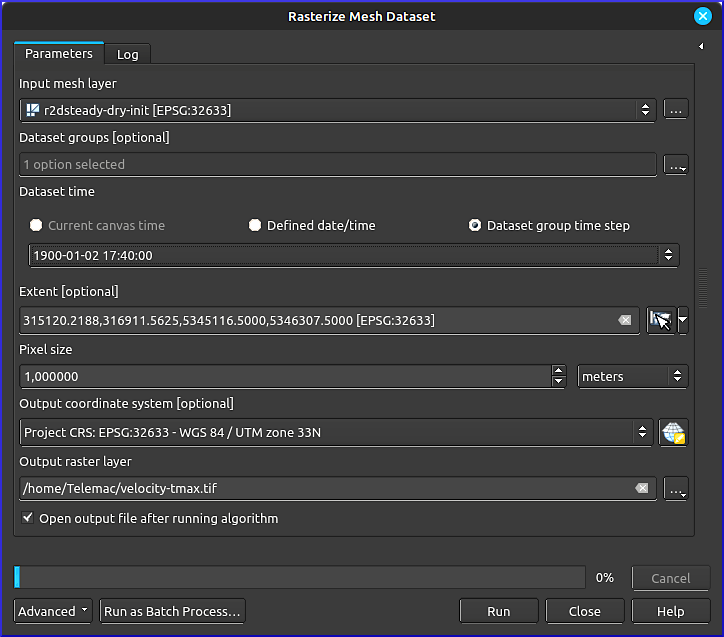
Figure 2:The Rasterize Mesh Dataset tool in QGIS.
The resulting velocity-tmax raster will be added to the Layers panel. For better visualization, some color is helpful. Therefore, double-click on the new velocity-tmax to open its properties. Go to the Symbology, change the Render type to Singleband pseudocolor, and use your favorite color ramp and number of classes for visualizing the velocity. To make 0-entries invisible, click on their Color symbol and set the Opacity to 0%, or set the Min to 0.0001.
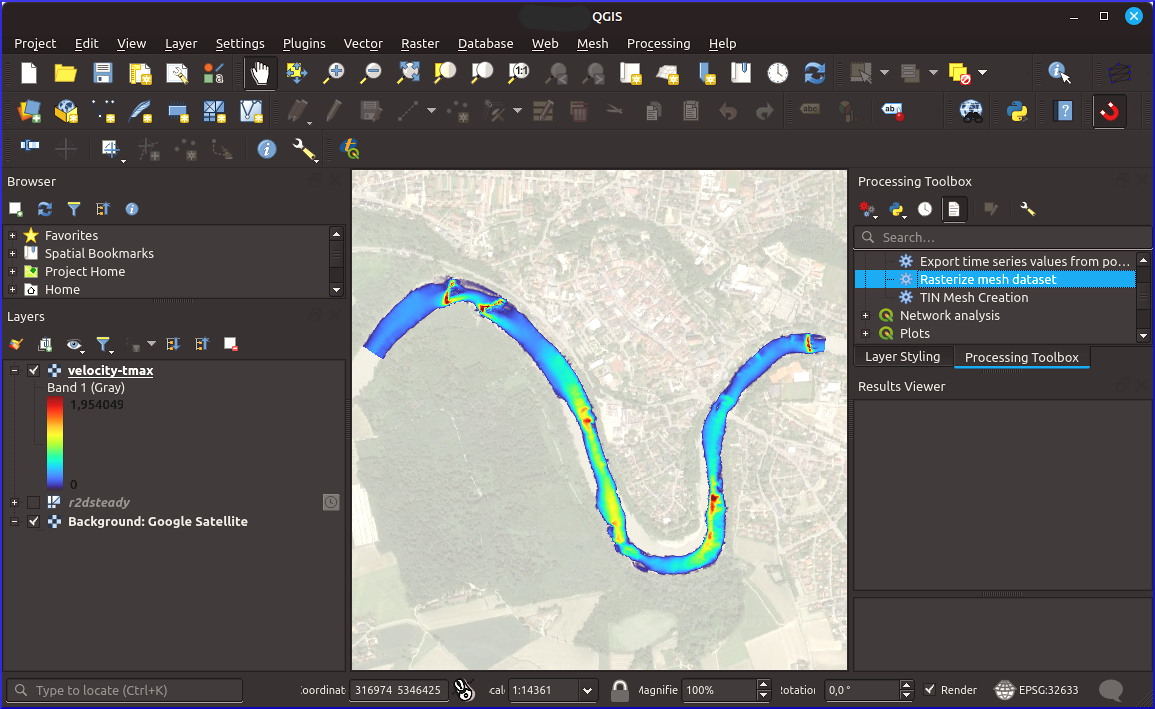
Figure 3:The exported flow velocity (VITESSE) GeoTIFF raster in QGIS (background map: Google (n.d.) satellite imagery). The location of the Raster mesh dataset tool in the Processing Toolbox is highlighted on the right.
Analyze Results
The first analysis of results should address the basic correctness of the model, for instance, regarding mass balance and its evolution over time. For this purpose, open the Time Controller  in QGIS top menu.
Quantitative Discharge Convergence
During the simulation, the keywords MASS-BALANCE : YES and/or PRINTING CUMULATED FLOWRATES : YES print mass fluxes across liquid boundaries in the Terminal. To retrospectively review flux rates and volume balance, the simulation must have run with the -s flag, which saves the simulation state in a file called similar to steady2d.cas_YEAR-MM-DD-HHhMMminSSs.sortie. Based on the .sortie file, sums of fluxes, the total volume, and volume error can be extracted and analyzed with the Python scripts provided along with the Telemac installation (HOMETEL/scripts/python3/). The Telemac Jupyter notebooks (HOMETEL/notebooks/ > data_manip/extraction/*.ipynb or workshops/exo_fluxes.ipynb) exemplify the usage of the Python scripts. A detailed discussion on convergence and tweaked Python scripts (pythomac) can be found in this eBook, in the chapter on quantitative Telemac convergence analysis. With these scripts, Fig. 4 was generated showing the flows across the two boundaries of the steady-2d study, indicating convergence after approximately 7000 timesteps.
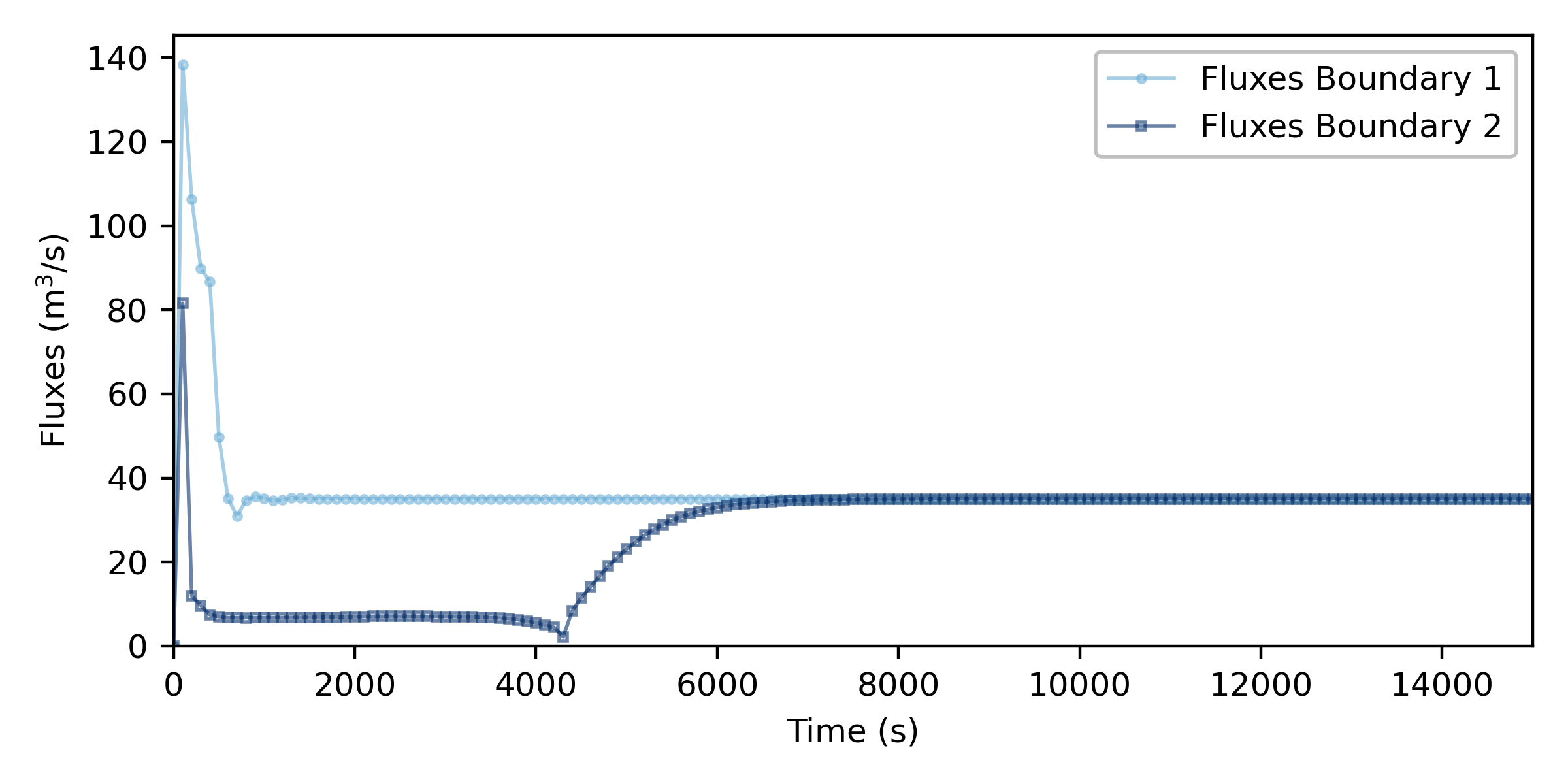
Figure 4:Flux convergence plot across the two boundaries of the dry-initialized steady Telemac2d simulation (created with pythomac).
Qualitative Velocity, Depth, and Discharge Evolution
The convergence of water depth and flow velocity, and therefore, discharge, can be qualitatively observed in QGIS through the Time Controller (see activation in Fig. 5). The frequency of images can be set through clicking on the cogwheel of the time controller, and image sequences played by clicking in the Play button. Additionally, Fig. 5 uses an overlay of water depth pixel colors (contour plot), and flow velocity vectors, defined in the Layer Styling panel. The North and discharge arrows, and the title are Decorators, which can be found in View > Decorators.
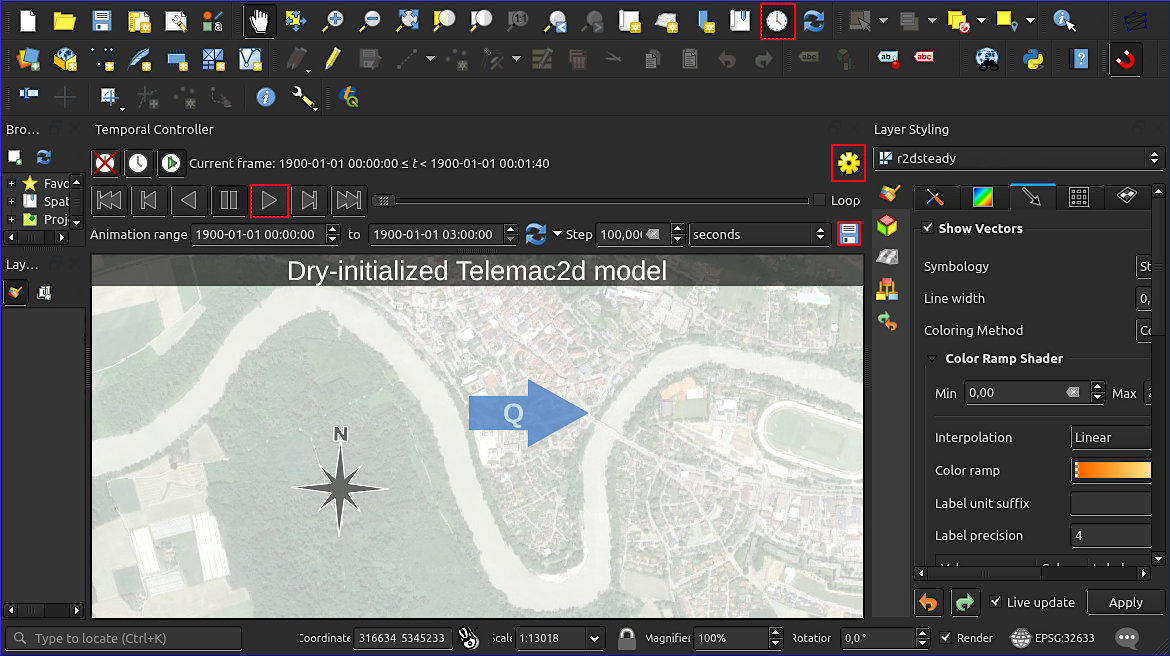
Figure 5:The activated time controller in QGIS enables to move along the time axis of modeled quantities (background map: Google (n.d.) satellite imagery). The red-highlighted buttons activate the time controller, play the sequence of images of selected quantities, provide a setting for playing a frequency of images per second, and enable saving images of all timesteps (see instructions below).
To export a series of images for turning them into a movie-like GIF, use the Save button of the time controller. Set up the desired resolution and define an output folder. The series of PNG images can then be converted, for example, with GIMP, into a GIF. For this purpose, download and open GIMP, then:
Open the first image of the exported series.
Pull all other exported images into the Layers panel of GIMP.
Reverse the order of the layers in GIMP: Layer > Stack > Reverse Layer Order.
Save the image as GIF: File > Export As....
Select a folder to save the file, in the Name field enter
[any-name].GIF, and click Export.In the popup window enable As animation and Loop forever with a recommended delay between frames of 100 milliseconds. Keep all other defaults and click Export.
The animated figure below features an exported GIF with water depth in the background and flow velocity as streamline-vectors ranging from 0 to 2.0 m/s. The animation shows how the model is filled from both its upstream (left) and downstream (right) boundaries at the beginning of the simulation. While the upstream discharge was imposed along with a water depth through a 5 5 5 boundary, the downstream boundary only had a prescribed water depth 5 4 4 boundary. The prescription of sufficient water depths was necessary to avoid supercritical flows at the boundaries, which would make the numerical model crash immediately. Because the flux coming from the downstream boundary needs to move uphill, it cannot go very fast and is rolled over by a wave of water coming from the upstream boundary. If a downstream flux was prescribed, the model would have been more unstable and overdetermined.
GIF sequence of a dry-initialized Telemac2d model (large file size!)

Convert to VTK (ParaView)
ParaView is great for 3D analysis. A straightforward way to load TELEMAC .slf result files is to convert them to the .vtk format. One quick way to get this conversion done is by using pputils. To this end, first clone pputils, then make sure the numpy dependency is installed in the same Python environment that you will use for the conversion. Remember where you downloaded pputils:
git clone https://codeberg.org/pprodano/pputils.git
python -m pip install numpy
After that, cd into your TELEMAC model directory (where the .slf file lives) and create a new Python script named slf2vtk.py with the following contents. Make sure to set PPUTILS_DIR to the cloned pputils directory and modify input_slf="results.slf" and output_template="vtk/results.vtk" to your needs:
Click to unroll Python code
"""slf2vtk.py"""
from pathlib import Path
import subprocess
import sys
from typing import List, Optional, Union


PPUTILS_DIR = Path(r"/path/to/pputils").expanduser().resolve()


def slf_to_vtk(
    input_slf: Union[str, Path],
    output_template: Union[str, Path],
    *,
    binary: bool = True,
    start: Optional[int] = None,
    end: Optional[int] = None,
) -> List[Path]:
    """Convert a SELAFIN file to one VTK file per time step."""

    input_slf = Path(input_slf).expanduser().resolve()
    output_template = Path(output_template).expanduser().resolve()

    if not input_slf.is_file():
        raise FileNotFoundError(input_slf)

    if output_template.suffix.lower() != ".vtk":
        raise ValueError("output_template must end in .vtk")

    if "." in output_template.stem:
        raise ValueError("Avoid additional dots in the output filename")

    if (start is None) != (end is None):
        raise ValueError("Specify both start and end, or neither")

    if start is not None and end is not None:
        if start < 0 or end < 0:
            raise ValueError("start and end must be non-negative")
        if start > end:
            raise ValueError("start must be less than or equal to end")

    converter = PPUTILS_DIR / (
        "sel2vtk_bin.py" if binary else "sel2vtk.py"
    )

    if not converter.is_file():
        raise FileNotFoundError(f"PPUTILS converter not found: {converter}")

    output_template.parent.mkdir(parents=True, exist_ok=True)

    command = [
        sys.executable,
        str(converter),
        "-i",
        str(input_slf),
        "-o",
        output_template.name,
    ]

    if start is not None and end is not None:
        # start/end are zero-based time-step indices.
        command += ["-t_start", str(start), "-t_end", str(end)]

    subprocess.run(
        command,
        cwd=output_template.parent,
        check=True,
    )

    pattern = output_template.stem + "[0-9]" * 5 + ".vtk"
    generated_files = sorted(output_template.parent.glob(pattern))

    if not generated_files:
        raise RuntimeError("pputils did not produce any VTK files")

    return generated_files


if __name__ == "__main__":
    generated_files = slf_to_vtk(
        input_slf="results.slf",
        output_template="vtk/results.vtk",
        binary=True,
        # start=0,
        # end=10,
    )

    for path in generated_files:
        print(path)
Then run it in a terminal from your TELEMAC model directory:
python slf2vtk.pyThe value given as output_template is a filename template rather than the name of one final file. For instance, vtk/results.vtk produces vtk/results00000.vtk, vtk/results00001.vtk, and so on; one file for each time step in the .slf file.
By default, the script uses sel2vtk_bin.py to write binary VTK files. Set binary=False to write ASCII VTK files instead. To convert only part of the result series, uncomment start and end; these values are zero-based, inclusive time-step indices rather than simulation times.
Load TELEMAC-3D Velocities in ParaView
The VTK files generated in the preceding workflow contain the TELEMAC-3D velocity components (u), (v), and (w). These quantities represent the signed velocities in the (x)-, (y)-, and (z)-directions, respectively. The corresponding three-dimensional velocity magnitude is
On a Debian computer, install ParaView from the Debian repository if it is not already available, then open the converted file series from the model directory:
sudo apt update
sudo apt install paraview

cd /path/to/telemac/model/vtk
paraview --data="$PWD/results..vtk"
In the final command, the two consecutive periods replace the numbered part of files such as results00000.vtk, results00001.vtk, and results00002.vtk. ParaView normally recognizes this naming pattern as a temporal file series. After the reader appears in the Pipeline Browser, select it and click Apply.
When sel2vtk_bin.py or sel2vtk.py detects the TELEMAC variables VELOCITY U, VELOCITY V, and VELOCITY W, pputils combines them into the point-data vector Velocity. To display the total speed directly, select Velocity from the Coloring menu and then select Magnitude. The vector components X, Y, and Z correspond to (u), (v), and (w), respectively. The original scalar arrays also remain available as VELOCITY_U, VELOCITY_V, and VELOCITY_W.
If the velocity magnitude is required as a separate array for clipping, thresholding, probing, or export, select the VTK reader in the Pipeline Browser, then choose Filters > Common > Calculator. Set Result Array Name to VELOCITY_MAGNITUDE, confirm that the data association is Point Data, and enter:
mag(Velocity)Click Apply, then color the Calculator output by VELOCITY_MAGNITUDE. For an animation, use Rescale to Data Range over All Timesteps so that one color scale is applied consistently throughout the simulation. This operation reads every time step and may therefore require additional time for a large TELEMAC-3D result set.
The file-series syntax, vector coloring, and Calculator expression follow the ParaView data-loading, color-mapping, and Calculator documentation. ParaView is available as an official Debian package.
Exercise: Initial Conditions
The above Fig. 1 and depth-velocity animation point to stability achieved after approximately 7000 timesteps. A wet-initialized model converges much faster, but either requires a previous run of a dry model initialization, or it can make use of other initial condition keywords in Telemac. Ideally, the dry-initialized model is used as a so-called hotstart condition for a wet-initialized model, as described in the unsteady 2d tutorial.
Notes on Calibration
Refresher: How Does Calibration Work?
Calibration involves the step-wise adaptation of model input parameters to yield a possibly best (statistic) fit of modeled and measured data. In the process of model calibration, only one parameter should be modified at a time by 10 to 20-% deviations from its default value. For instance, if the beginning FRICTION COEFFICIENT : 0.03, the calibration may test for FRICTION COEFFICIENT : 0.033, then FRICTION COEFFICIENT : 0.036, FRICTION COEFFICIENT : 0.027 and so on, ultimately to find out which value for FRICTION COEFFICIENT brings the model results closest to observations.
Moreover, a sensitivity analysis compares step-wise modifications of multiple parameters (still: one at a time) and theirs effect on model results. For instance, if a 10-% variation of FRICTION COEFFICIENT yields a 5-% change in global water depth while a 10-% variation of grid size (edge length) yields a 20-% change in global water depth, it may be concluded that the model sensitivity is higher with respect to the grid size. However, such conclusions require careful considerations in multi-parametric, complex models of river ecosystems.
Calibration Parameters in Telemac
The following parameters may be used for calibrating a 2d model to measurements (e.g., water surface elevation, water depth, or flow velocity data):
FRICTION COEFFICIENT (friction section)
Solvers, solver options, implicitation and other numerical parameters (numerical parameter section)
Type of model initialization
Next Steps
Make sure the simulation is conservative according to the descriptions in the spotlight chapter on mass balance.
Find a meaningful simulation duration for convergence of a dry-initialized simulation following the algorithms provided with the chapter on quantitative convergence.
Use the dry-initialized model to simulate at least 2-3 steady discharges (with hotstart conditions) for which measurement data is available for calibration and validation.
The calibrated and validated model can be
used for unsteady hydrodynamic simulations, and
serve a basis for morphodynamic sediment transport modeling with Gaia.
- Kundu, P. K., & Cohen, I. M. (2008). Fluid Mechanics (4th ed.). Elsevier Inc.
- Roe, P. L. (1981). Approximate Riemann solvers, parameter vectors, and difference schemes. Journal of Computational Physics, 43(2), 357–372. 10.1016/0021-9991(81)90128-5
- Audusse, E., Bristeau, M., & Perthame, B. (2000). Kinetic Schemes for Saint-Venant Equations with Source Terms on Unstructured Grids (Research Report RR-3989). INRIA. https://hal.inria.fr/inria-00072657
- Zokagoa, J.-M., & Soulaïmani, A. (2010). Modeling of wetting–drying transitions in free surface flows over complex topographies. Computer Methods in Applied Mechanics and Engineering, 199(33), 2281–2304. 10.1016/j.cma.2010.03.023
- Tchamen, G. W., & Kahawita, R. A. (1998). Modelling wetting and drying effects over complex topography. Hydrological Processes, 12(8), 1151–1182. https://doi.org/10.1002/(SICI)1099-1085(19980630)12:8<;1151::AID-HYP676>3.0.CO;2-Y
- Toro, E. F. (2009). The HLL and HLLC Riemann Solvers. In E. F. Toro (Ed.), Riemann Solvers and Numerical Methods for Fluid Dynamics: A Practical Introduction (pp. 315–344). Springer. 10.1007/b79761_10
- Ata, R. (2012). TELEMAC-2D new finite volume schemes for shallow water equations with source terms on 2D unstructured grids. Proceedings of the XIXth TELEMAC-MASCARET User Conference 2012, 18 to 19 October 2012, St Hugh’s College, Oxford, 93–98. http://henry.baw.de/handle/20.500.11970/104290
- Haaland, S. E. (1983). Simple and Explicit Formulas for the Friction Factor in Turbulent Pipe Flow. Journal of Fluids Engineering, 105(1), 89–90. 10.1115/1.3240948
- Colebrook, C. F., & White, C. M. (1937). Experiments with fluid friction in roughened pipes. Proceedings of the Royal Society of London. Series A - Mathematical and Physical Sciences, 161(906), 367–381. 10.1098/rspa.1937.0150
- Chézy, A. de. (1776). Formula to find the uniform velocity that the water will have in a ditch or in a canal of which the slope is known. In Collection of Manuscripts in the Library of the Ecole des Ponts et Chaussées: Vol. 61 (No. 847) (pp. 165–269). École des Ponts et Chaussées.
- Strickler, A. (1923). Beiträge zur Frage der Geschwindigkeitsformel und der Rauhigkeitszahlen für Ströme, Kanäle und geschlossene Leitungen [Contributions to the question of the velocity formula and the roughness figures for streams, channels and closed pipes]. Mitteilungen Des Eidgenössischen Amtes Für Wasserwirtschaft, Switzerland, 16, 357.
- Manning, R. (1891). Transactions of the Institution of Civil Engineers of Ireland (Vol. 20, pp. 161–207). Civil Engineers of Ireland.
- Nikuradse, J. (1933). Strömungsgesetze in rauhen Rohren [Laws of flow in rough pipes]. VDI Forschungsheft, Beilage Zu “Forschung Auf Dem Gebiete Des Ingenieurwesens,” Ausgabe B, Band 4(361), 26.
- van Rijn, L. C. (2019). Critical movement of large rocks in currents and waves. International Journal of Sediment Research, 34(4), 387–398. 10.1016/j.ijsrc.2018.12.005
- Von Karmàn, T. (1930). Mechanische Ähnlichkeit und Turbulenz [Mechanical similarity and turbulence]. In Third International Congress for Applied Mechanics (Vol. 1, pp. 79–93). Stockholm.