Requirements
Complete the Telemac steady 2d tutorial (or an equivalent steady simulation).
The steering (
.cas) file must contain the keywordsMASS-BALANCE : YESand/orPRINTING CUMULATED FLOWRATES : YES, which cause TELEMAC to report the mass fluxes across the liquid boundaries in the listing.The TELEMAC simulation must have been executed with the
-sflag (details below):
telemac2d.py [STUDY-NAME].cas -sA Python (≥ 3.9) installation with the
numpy,pandas, andmatplotliblibraries (see the Python installation guide);flusstoolsis not required.
All simulation files used in this tutorial can be downloaded from the hydro-informatics/telemac repository on GitHub (see details below).
This chapter uses the simulation files from the Telemac steady 2d tutorial, with a modified definition of the time step and printout periods:
/ steady2d-conv.cas
TIME STEP : 1.
NUMBER OF TIME STEPS : 10000
GRAPHIC PRINTOUT PERIOD : 50
LISTING PRINTOUT PERIOD : 50
In addition, the simulation was re-executed with the -s flag, which writes the complete listing to a file named [FILE-NAME].cas_YEAR-MM-DD-HHhMMminSSs.sortie in the simulation directory:
telemac2d.py steady2d-conv.cas -sBoth the steering .cas and the .sortie files can be downloaded from the hydro
Extract and Check Flux Data
The TELEMAC Jupyter notebook templates (HOMETEL/notebooks/ > data_manip/extraction/*.ipynb or workshops/exo_fluxes.ipynb) provide guidance for extracting data from simulation results; however, the templates do not constitute a directly applicable framework for assessing mass convergence at the boundaries as a function of NUMBER OF TIME STEPS. For this purpose, hydronumpy, pandas, and matplotlib (see the Python installation guide) and runs outside the TELEMAC Python environment. Two installation options are available:
Install the pythomac package from the Python Package Index:
pip install pythomacFor development purposes, clone the pythomac repository from GitHub and install it in editable mode:
git clone https://github.com/hydro-informatics/pythomac.git
pip install -e pythomac
Note that since version 3.0.0, pythomac is a regular Python package with in-package imports; copying the pythomac/pythomac/ folder next to a simulation (the pre-3.0 workflow) is no longer supported.
The central function is pythomac.extract_fluxes(). It locates the most recent .sortie listing next to the steering file, parses the volume balance and the signed flux printed for every liquid boundary at each listing printout (both the classical THERE IS n LIQUID BOUNDARIES and the TELEMAC v9 NUMBER OF LIQUID BOUNDARIES: listing formats are recognized), and writes into the simulation directory:
extracted-fluxes.csv- the time series of the volume in the domain and of the flux across every liquid boundary; andflux-convergence.png- a plot of the flux magnitudes over simulation time (optional,plotting=True).
The function returns the extracted series as a pandas.DataFrame indexed by simulation time; the working directory of the calling process is not modified. The implementation can be inspected in flux_analyst.py on GitHub, and the complete API documentation is available at https://
To apply the function, copy the following code into a new Python script called, for instance, example_flux_convergence.py, located in the directory where the dry-initialized steady2d simulation ran (or download example_flux_convergence.py):
# example_flux_convergence.py

from pathlib import Path
from pythomac import extract_fluxes

simulation_dir = str(Path(__file__).parents[1])
telemac_cas = "steady2d.cas"

fluxes_df = extract_fluxes(
    model_directory=simulation_dir,
    cas_name=telemac_cas,
    plotting=True
)Run the Python script from a terminal (or Anaconda Prompt) in the simulation directory:
python example_flux_convergence.pyThe script places in the simulation folder:
the CSV file extracted-fluxes.csv (download); and
the flux-convergence plot (flux-convergence.png) across the model boundaries (see Fig. 1), which indicates qualitatively that the fluxes approached convergence after approximately 6000-7000 time steps.
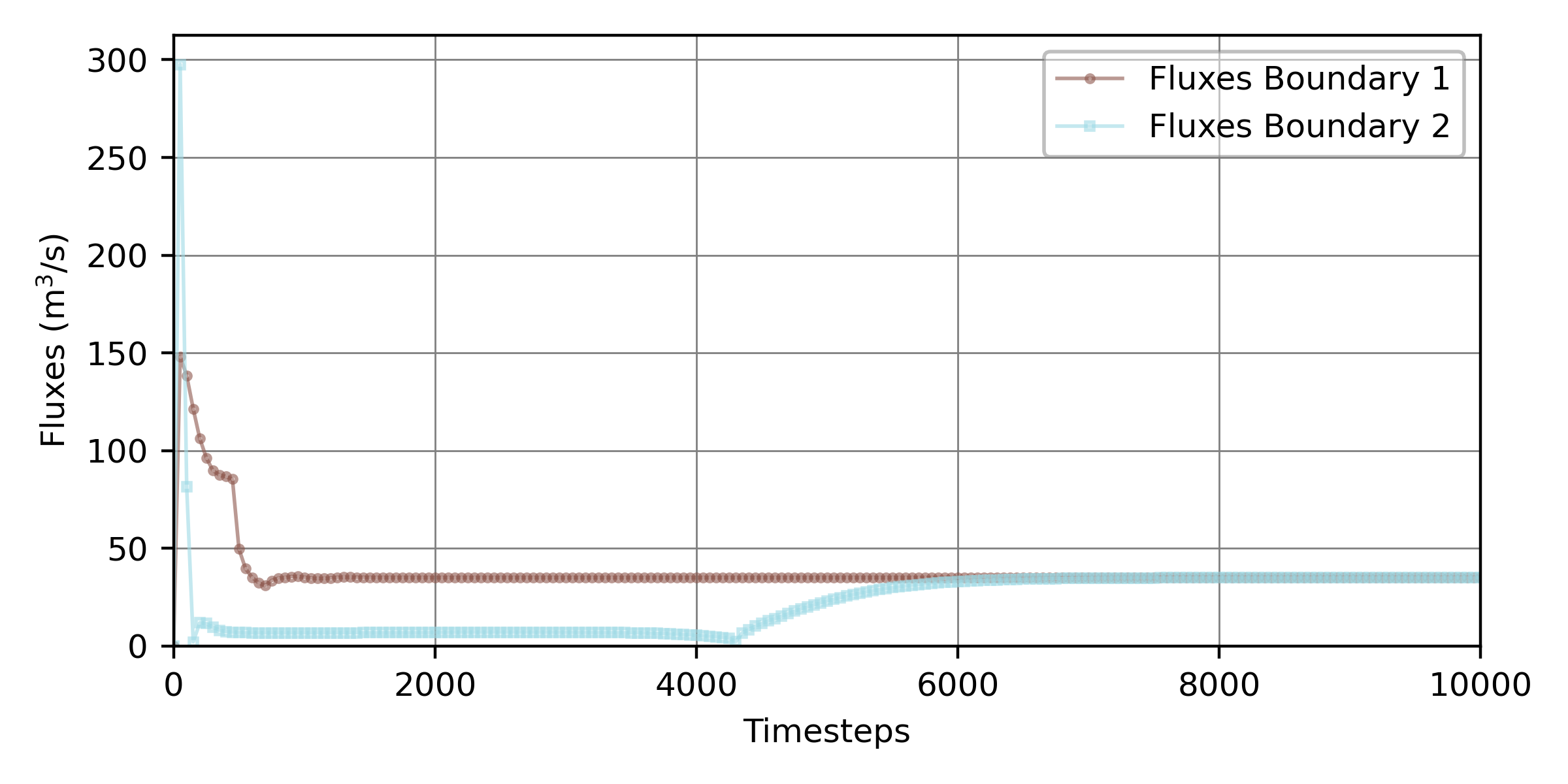
Figure 1:Flux magnitudes across the two liquid boundaries of the dry-initialized steady Telemac2d simulation over the simulated time, produced with the pythomac.extract_fluxes() function.
Identify Convergence
To assess whether and when the boundary fluxes converged, the relative flux imbalance is evaluated at every printout time as:
where and = the outflow and inflow fluxes across the model boundaries at time , respectively. The flux magnitudes are required because TELEMAC reports boundary fluxes with a sign convention (inflow positive, outflow negative); mass balance therefore corresponds to , so that at convergence, and normalization by the inflow renders dimensionless. In a stable steady simulation, the ratio of consecutive flux imbalances approaches a convergence constant equal to unity with increasing time:
The combination of the convergence rate (or order) and the convergence constant indicates:
linear convergence if = 1 and ;
slow sublinear convergence if = 1 and = 1;
fast superlinear convergence if > 1 and ; and
divergence if = 1 and > 1, or < 1.
The time at which a steady simulation may be considered to have attained a stable state is identified by the onset of sublinear convergence ( = 1 and = 1); that is, the time beyond which each additional step improves the model precision only insignificantly (the term insignificant is quantified in the section below). Under the assumption that the model converges in some form, setting = 1 yields as a function of and :
These relations are implemented in the pythomac.calculate_convergence() function, which returns a pandas.DataFrame with the columns "Relative imbalance" (, Equation (1)) and "Convergence rate" (), indexed by simulation time. Its core reads:
import numpy as np
import pandas as pd
def calculate_convergence(series_1, series_2, conv_constant=1.):
# relative flux imbalance epsilon_t = ||Q_in| - |Q_out|| / |Q_in|; the magnitudes |.|
# are needed because Telemac reports outflow negative, so that balance -> epsilon -> 0
epsilon = np.abs(np.abs(series_1) - np.abs(series_2)) / np.abs(series_1)
# derive epsilon at t and t+1
epsilon_t0 = epsilon[:-1]  # cut off last element
epsilon_t1 = epsilon[1:]   # cut off element zero
# return the relative imbalance and the convergence rate iota as a pandas DataFrame
return pd.DataFrame({
"Relative imbalance": epsilon_t1,
"Convergence rate": np.emath.logn(epsilon_t0, epsilon_t1) / conv_constant,
})To compute (Python variable name: iota_t) with the above function, amend the example_flux_convergence.py Python script as follows:
# example_flux_convergence.py

# ...
# add to header:
from pythomac import calculate_convergence

# calculate fluxes_df (see above code block)
fluxes_df = [...]

# back-calculate the printout spacing (in simulation seconds) from the flux index
timestep_in_cas = int(max(fluxes_df.index.values) / (len(fluxes_df.index.values) - 1))

# calculate iota (t) with the calculate_convergence function
iota_t = calculate_convergence(
    series_1=fluxes_df["Fluxes Boundary 1"][1:],  # remove first zero-entry
    series_2=fluxes_df["Fluxes Boundary 2"][1:],  # remove first zero-entry
    cas_timestep=timestep_in_cas,
    plot_dir=simulation_dir,
)
The resulting convergence rate is plotted in Fig. 2 for the steady 2d tutorial with the modified printout periods of 50 seconds and a total simulation time of 10000 seconds.
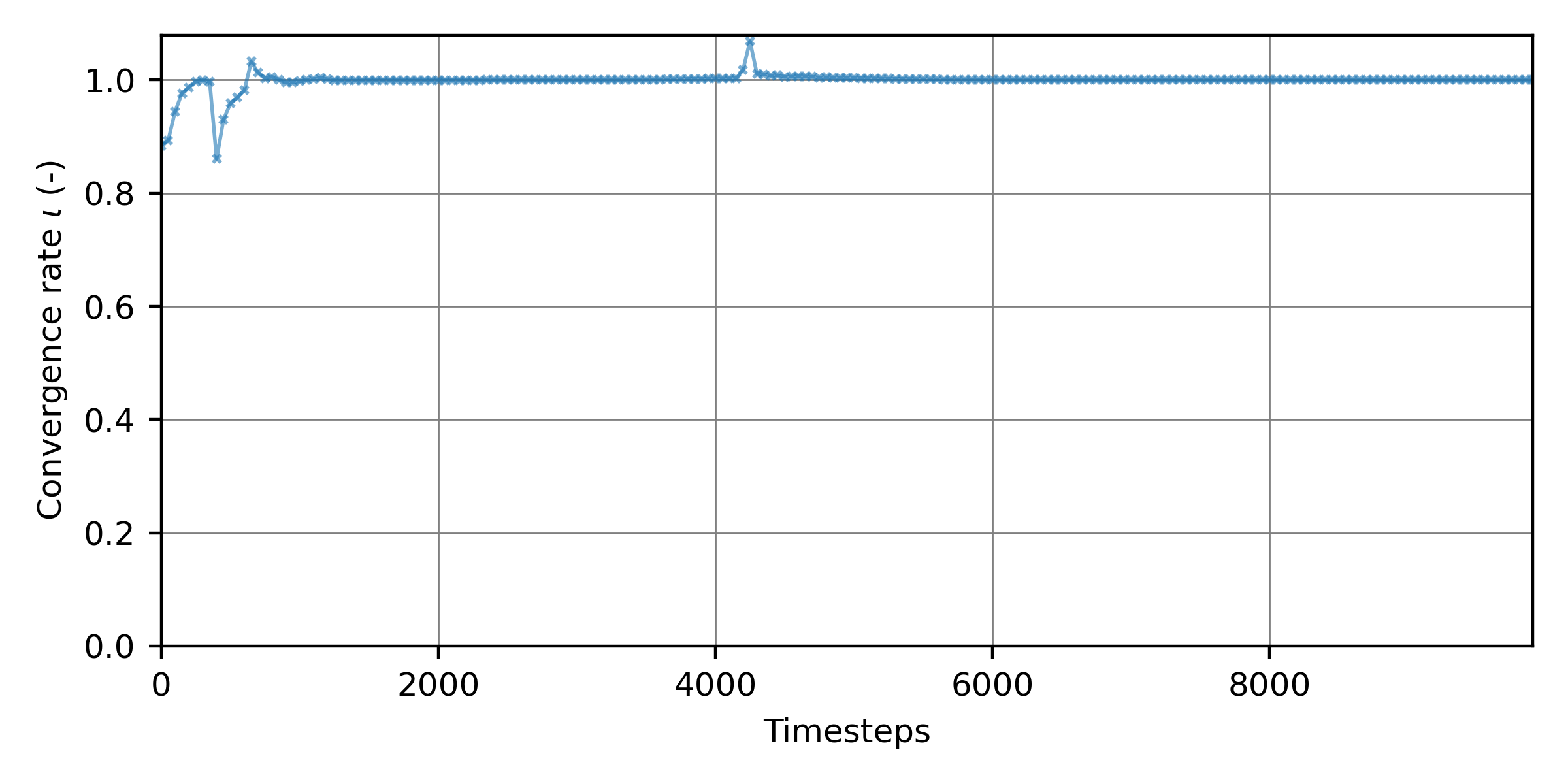
Figure 2:The convergence rate as a function of the 10000 simulation time steps of the steady 2d simulation.
Derive Optimum Simulation Time
To economize computing time, the time step at which the inflow and outflow fluxes converged is of practical interest. The fluxes plotted in Fig. 1 and the convergence rate in Fig. 2 suggest qualitatively that the simulation stabilized after approximately 6000 seconds (time steps). The local extrema in both figures near 4000 time steps mark the interaction of the wetting fronts propagating from the upstream and downstream boundaries (see the animation in the steady 2d tutorial); monotonic convergence sets in only thereafter.
Because a purely visual judgment of convergence is subjective, an objective criterion is adopted: the optimum simulation length is the smallest time beyond which the relative flux imbalance (Equation (1)) remains permanently below a target tolerance . Tolerances of = 10 are typically acceptable for preliminary calibration runs, whereas validation and hotstart-initialization runs warrant smaller values (10 or smaller). As Fig. 2 illustrates, the imbalance may temporarily drop below the tolerance and rise again (here near 4000 time steps, when the upstream front passes the downstream boundary); only the final, permanent crossing is relevant. The algorithmic implementation therefore detects the last time at which and designates the subsequent printout as the convergence time. This criterion is implemented in pythomac.get_convergence_time(), which returns the printout index of the permanent crossing, or numpy.nan (with a warning) if the tolerance is never sustained. Amend the example_flux_convergence.py script as follows:
# example_flux_convergence.py

# ...
# add to header:
from pythomac import get_convergence_time

# calculate fluxes_df and iota_t (see above code blocks)
fluxes_df = [...]
iota_t = [...]

# identify the printout index from which the relative flux imbalance stays
# permanently below the target tolerance (epsilon_tar)
convergence_time_iteration = get_convergence_time(
    relative_imbalance=iota_t["Relative imbalance"],
    convergence_precision=1.0E-4
)

if not str(convergence_time_iteration).lower() == "nan":
    print("The simulation converged after {0} simulation seconds ({1}th printout).".format(
            str(timestep_in_cas * convergence_time_iteration), str(convergence_time_iteration)))
The simulation converged after 6000 simulation seconds (120th printout).With the convergence time established, the NUMBER OF TIME STEPS keyword in the .cas steering file can be reduced accordingly, for example:
/ steady2d-conv.cas
TIME STEP : 1.
NUMBER OF TIME STEPS : 6000
GRAPHIC PRINTOUT PERIOD : 50
LISTING PRINTOUT PERIOD : 50Troubleshoot Instabilities & Divergence
If a steady simulation fails to attain stable fluxes, or if the fluxes diverge, verify that all boundaries are robustly defined according to the spotlight section on boundary conditions, and consult the workflow in the section on mass conservation.