Requirements
Complete the Telemac steady 2d tutorial (or an equivalent steady simulation).
Die Steuerungsdatei (
.cas) muss die SchlüsselwörterMASS-BALANCE : YESund/oderPRINTING CUMULATED FLOWRATES : YESenthalten, die TELEMAC veranlassen, die Massenflüsse über die Flüssigkeitsgrenzen in der Auflistung zu melden.Die TELEMAC-Simulation muss mit dem
-s-Flag ausgeführt worden sein (Details unten):
telemac2d.py [STUDY-NAME].cas -sEine Python-Installation (≥ 3.9) mit den Bibliotheken
numpy,pandasundmatplotlib(see the Python installation guide);flusstoolsist nicht erforderlich.
** Alle in diesem Tutorial verwendeten Simulationsdateien können aus dem Hydroinformatik / Telemac-Repository unter GitHub (siehe Details unten)] heruntergeladen werden.**
This chapter uses the simulation files from the Telemac steady 2d tutorial, with a modified definition of the time step and printout periods:
/ steady2d-conv.cas
TIME STEP : 1.
NUMBER OF TIME STEPS : 10000
GRAPHIC PRINTOUT PERIOD : 50
LISTING PRINTOUT PERIOD : 50
Darüber hinaus wurde die Simulation mit dem Flag -s erneut ausgeführt, das die vollständige Auflistung in eine Datei namens [FILE-NAME].cas_YEAR-MM-DD-HHhMMminSSs.sortie in das Simulationsverzeichnis schreibt:
telemac2d.py steady2d-conv.cas -sSowohl die Steuerung .cas als auch die .sortie-Dateien können aus den hydro-informatics.com-Repositories heruntergeladen werden:
Extrahieren und Überprüfen von Flussdaten
Die TELEMAC Jupyter Notebook-Vorlagen (HOMETEL/notebooks/ > data manip/extraction/*.ipynb oder workshops/exo fluxes.ipynb) bieten Anleitungen zum Extrahieren von Daten aus Simulationsergebnissen; die Vorlagen stellen jedoch keinen direkt anwendbaren Rahmen für die Bewertung der Massenkonvergenz an den Grenzen in Abhängigkeit von NUMBER OF TIME STEPS dar. Zu diesem Zweck unterhält hydronumpy, pandas und matplotlib (see the Python installation guide) und läuft außerhalb der TELEMAC Python-Umgebung. Es stehen zwei Installationsoptionen zur Verfügung:
Installieren Sie das Paket pythomac aus dem Python Package Index:
pip install pythomacZu Entwicklungszwecken klonen Sie das pythomac-Repository aus GitHub] und installieren Sie es im editierbaren Modus:
git clone https://github.com/hydro-informatics/pythomac.git
pip install -e pythomac
Beachten Sie, dass pythomac seit Version 3.0.0 ein reguläres Python-Paket mit Paketimporten ist; das Kopieren des pythomac/pythomac/-Ordners neben einer Simulation (der Pre-3.0-Workflow) wird nicht mehr unterstützt.
Die zentrale Funktion ist pythomac.extract_fluxes(). Es sucht die neueste .sortie-Liste neben der Steuerungsdatei, analysiert die Volumenbilanz und den signierten Fluss, der für jede Flüssigkeitsgrenze bei jedem Listenausdruck gedruckt wird (sowohl das klassische THERE IS n LIQUID BOUNDARIES als auch das TELEMAC v9 NUMBER OF LIQUID BOUNDARIES:Listing-Format werden erkannt) und schreibt in das Simulationsverzeichnis:
extracted-fluxes.csv- die Zeitreihe des Volumens in der Domäne und des Flusses über jede Flüssigkeitsgrenze; undflux-convergence.png- ein Diagramm der Flussgrößen über die Simulationszeit (optional,plotting=True).
The function returns the extracted series as a pandas.DataFrame indexed by simulation time; the working directory of the calling process is not modified. The implementation can be inspected in flux_analyst.py on GitHub, and the complete API documentation is available at https://
Um die Funktion anzuwenden, kopieren Sie den folgenden Code in ein neues Python-Skript mit dem Namen example_flux_convergence.py, das sich in dem Verzeichnis befindet, in dem die trocken-initialisierte steady2d-Simulation ausgeführt wurde (oder download example flux convergence.py]):
# example_flux_convergence.py

from pathlib import Path
from pythomac import extract_fluxes

simulation_dir = str(Path(__file__).parents[1])
telemac_cas = "steady2d.cas"

fluxes_df = extract_fluxes(
    model_directory=simulation_dir,
    cas_name=telemac_cas,
    plotting=True
)Führen Sie das Python-Skript von einem Terminal (oder Anaconda Prompt) im Simulationsverzeichnis aus:
python example_flux_convergence.pyDas Skript platziert sich im Simulationsordner:
die CSV-Datei extracted-fluxes.csv (Download)] und
das Fluss-Konvergenz-Plot (flux-convergence.png) über die Modellgrenzen hinweg (siehe Fig. 1), das qualitativ anzeigt, dass sich die Flüsse nach etwa 6000-7000 Zeitschritten der Konvergenz näherten.
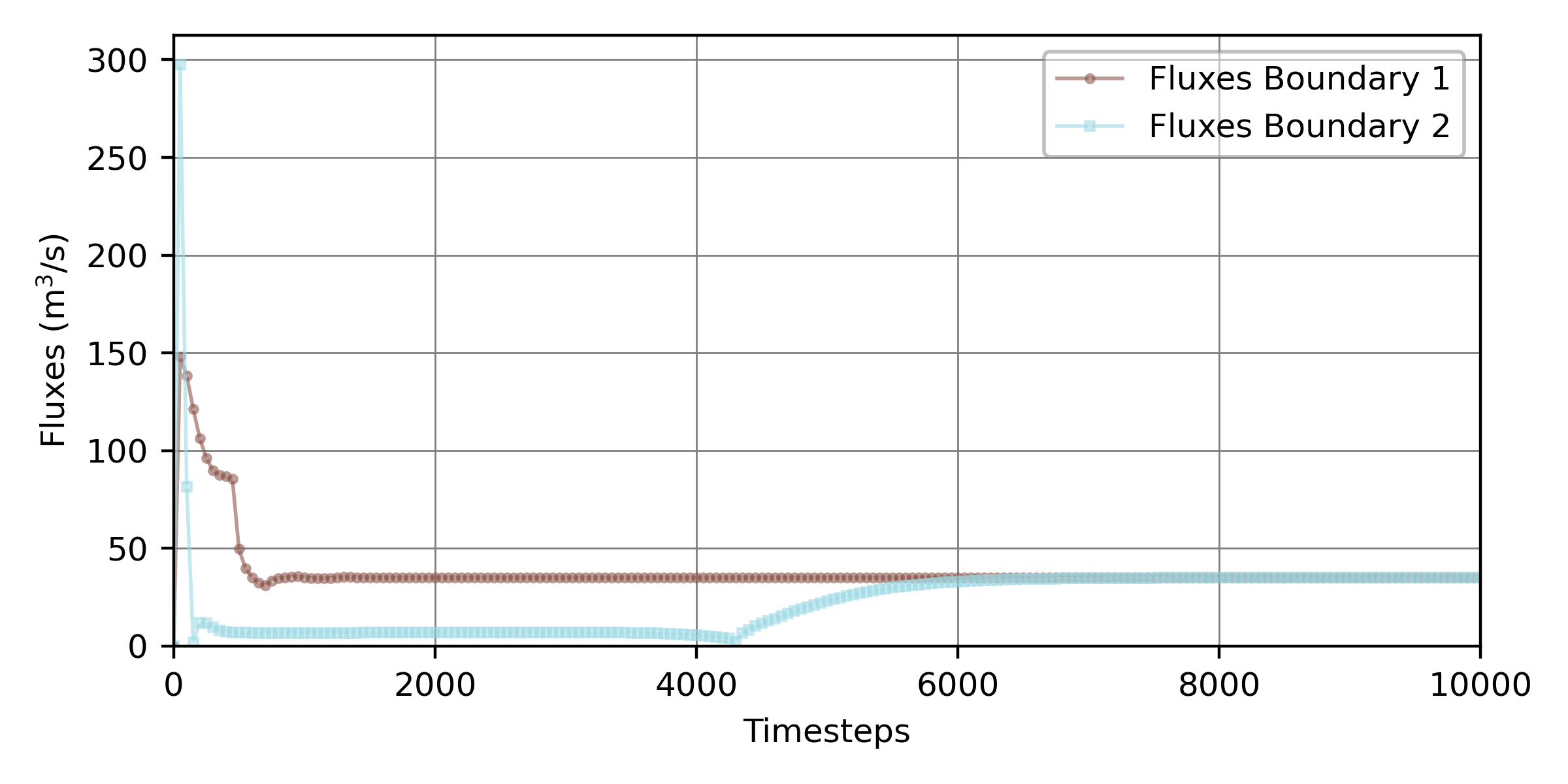
Figure 1:Flussgrößen über die beiden Flüssigkeitsgrenzen der trockeninitialisierten stationären Telemac2d-Simulation über die simulierte Zeit, erzeugt mit der Funktion pythomac.extract fluxes().
Identifizieren von Konvergenz
To assess whether and when the boundary fluxes converged, the relative flux imbalance is evaluated at every printout time as:
where and = the outflow and inflow fluxes across the model boundaries at time , respectively. The flux magnitudes are required because TELEMAC reports boundary fluxes with a sign convention (inflow positive, outflow negative); mass balance therefore corresponds to , so that at convergence, and normalization by the inflow renders dimensionless. In a stable steady simulation, the ratio of consecutive flux imbalances approaches a convergence constant equal to unity with increasing time:
Die Kombination der Konvergenzrate (oder Ordnung) und der Konvergenzkonstanten zeigt an:
lineare Konvergenz, wenn = 1 **und
langsame sublineare Konvergenz, wenn = 1 **und = 1
schnelle superlineare Konvergenz, wenn > 1 **und und
Divergenz wenn = 1 **und > 1, **oder < 1.
Der Zeitpunkt, zu dem eine stationäre Simulation als stabil angesehen werden kann, wird durch den Beginn der sublinearen Konvergenz ( = 1 und = 1) identifiziert, dh der Zeitpunkt , ab dem jeder weitere Schritt die Modellpräzision nur unwesentlich verbessert (der Begriff unwesentlich wird im section below quantifiziert). Unter der Annahme, dass das Modell in irgendeiner Form konvergiert, ergibt die Einstellung = 1 als Funktion von und :
Diese Beziehungen werden in der Funktion pythomac.calculate_convergence() implementiert, die ein pandas.DataFrame mit den Spalten "Relative imbalance" (, Gleichung (1)) und "Convergence rate" () zurückgibt, indiziert nach Simulationszeit. Sein Kern lautet:
import numpy as np
import pandas as pd
def calculate_convergence(series_1, series_2, conv_constant=1.):
# relative flux imbalance epsilon_t = ||Q_in| - |Q_out|| / |Q_in|; the magnitudes |.|
# are needed because Telemac reports outflow negative, so that balance -> epsilon -> 0
epsilon = np.abs(np.abs(series_1) - np.abs(series_2)) / np.abs(series_1)
# derive epsilon at t and t+1
epsilon_t0 = epsilon[:-1]  # cut off last element
epsilon_t1 = epsilon[1:]   # cut off element zero
# return the relative imbalance and the convergence rate iota as a pandas DataFrame
return pd.DataFrame({
"Relative imbalance": epsilon_t1,
"Convergence rate": np.emath.logn(epsilon_t0, epsilon_t1) / conv_constant,
})Um (Python-Variablenname: iota_t) mit der obigen Funktion zu berechnen, ändern Sie die *beispiel flux convergence.py * Python Skript wie folgt:
# example_flux_convergence.py

# ...
# add to header:
from pythomac import calculate_convergence

# calculate fluxes_df (see above code block)
fluxes_df = [...]

# back-calculate the printout spacing (in simulation seconds) from the flux index
timestep_in_cas = int(max(fluxes_df.index.values) / (len(fluxes_df.index.values) - 1))

# calculate iota (t) with the calculate_convergence function
iota_t = calculate_convergence(
    series_1=fluxes_df["Fluxes Boundary 1"][1:],  # remove first zero-entry
    series_2=fluxes_df["Fluxes Boundary 2"][1:],  # remove first zero-entry
    cas_timestep=timestep_in_cas,
    plot_dir=simulation_dir,
)
The resulting convergence rate is plotted in Fig. 2 for the steady 2d tutorial with the modified printout periods of 50 seconds and a total simulation time of 10000 seconds.
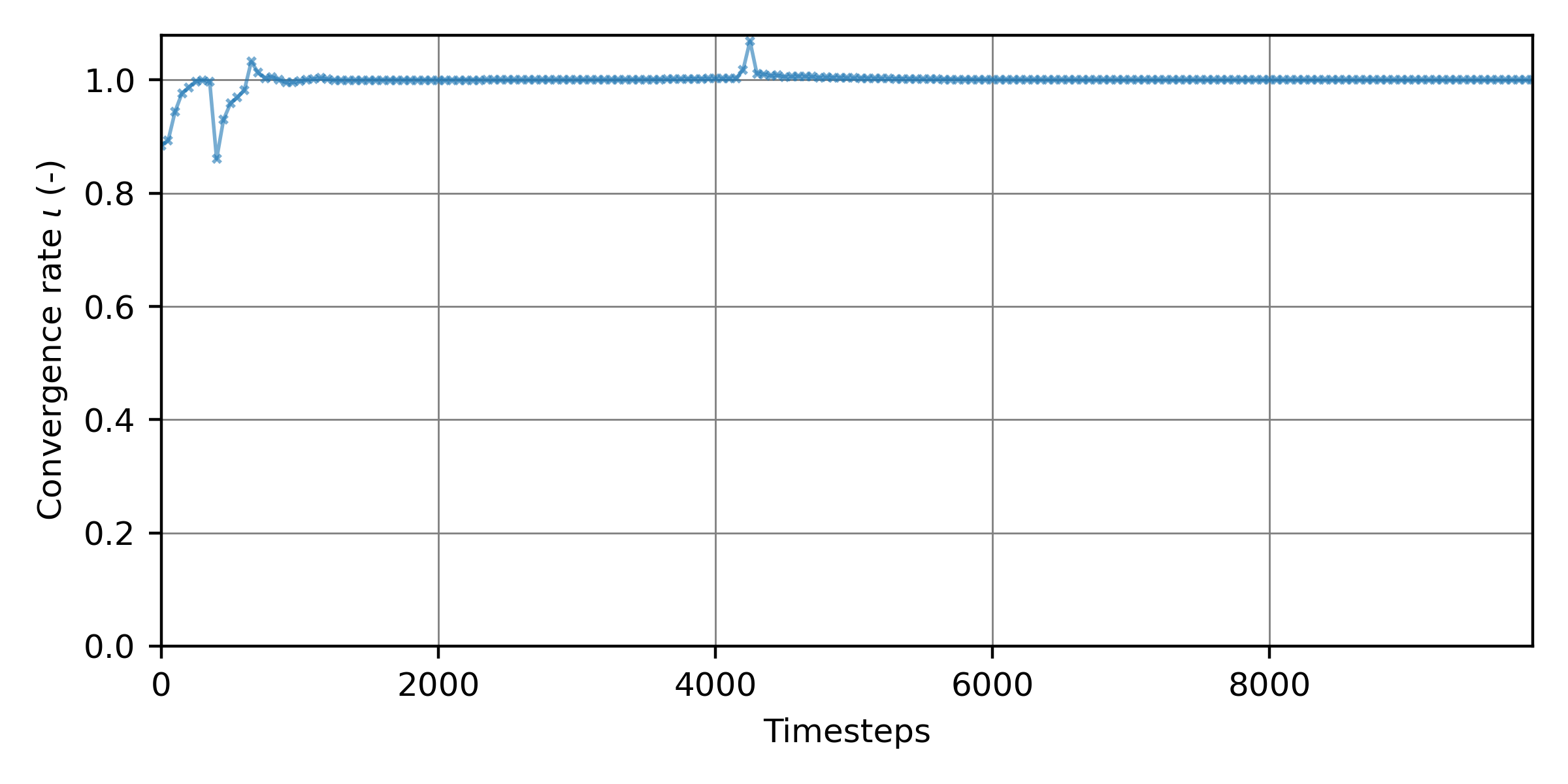
Figure 2:The convergence rate as a function of the 10000 simulation time steps of the steady 2d simulation.
Ableitung der optimalen Simulationszeit
To economize computing time, the time step at which the inflow and outflow fluxes converged is of practical interest. The fluxes plotted in Fig. 1 and the convergence rate in Fig. 2 suggest qualitatively that the simulation stabilized after approximately 6000 seconds (time steps). The local extrema in both figures near 4000 time steps mark the interaction of the wetting fronts propagating from the upstream and downstream boundaries (see the animation in the steady 2d tutorial); monotonic convergence sets in only thereafter.
Because a purely visual judgment of convergence is subjective, an objective criterion is adopted: the optimum simulation length is the smallest time beyond which the relative flux imbalance (Equation (1)) remains permanently below a target tolerance . Tolerances of = 10 are typically acceptable for preliminary calibration runs, whereas validation and hotstart-initialization runs warrant smaller values (10 or smaller). As Fig. 2 illustrates, the imbalance may temporarily drop below the tolerance and rise again (here near 4000 time steps, when the upstream front passes the downstream boundary); only the final, permanent crossing is relevant. The algorithmic implementation therefore detects the last time at which and designates the subsequent printout as the convergence time. This criterion is implemented in pythomac.get_convergence_time(), which returns the printout index of the permanent crossing, or numpy.nan (with a warning) if the tolerance is never sustained. Amend the example_flux_convergence.py script as follows:
# example_flux_convergence.py

# ...
# add to header:
from pythomac import get_convergence_time

# calculate fluxes_df and iota_t (see above code blocks)
fluxes_df = [...]
iota_t = [...]

# identify the printout index from which the relative flux imbalance stays
# permanently below the target tolerance (epsilon_tar)
convergence_time_iteration = get_convergence_time(
    relative_imbalance=iota_t["Relative imbalance"],
    convergence_precision=1.0E-4
)

if not str(convergence_time_iteration).lower() == "nan":
    print("The simulation converged after {0} simulation seconds ({1}th printout).".format(
            str(timestep_in_cas * convergence_time_iteration), str(convergence_time_iteration)))
The simulation converged after 6000 simulation seconds (120th printout).Mit der festgelegten Konvergenzzeit kann das Schlüsselwort NUMBER OF TIME STEPS in der Steuerungsdatei .cas entsprechend reduziert werden, zum Beispiel:
/ steady2d-conv.cas
TIME STEP : 1.
NUMBER OF TIME STEPS : 6000
GRAPHIC PRINTOUT PERIOD : 50
LISTING PRINTOUT PERIOD : 50Fehlersuche bei Instabilitäten und Divergenzen
If a steady simulation fails to attain stable fluxes, or if the fluxes diverge, verify that all boundaries are robustly defined according to the spotlight section on boundary conditions, and consult the workflow in the section on mass conservation.