In this tutorial we will solve a problem of a 50-m long straight channel with two basins, one smaller one at the inlet, and a larger one at the outlet, and an obstacle located in the middle.

Figure 1:3D view of the analyzed structure.
In this case, we will use the multiphase solver interFoam coupled with a k - (epsilon) turbulence model. interFoam identifies the water-air interface based on the Volume of Fluid (VOF) method, which solves the transport equations for a single or multiple phase fractions alpha, where alpha is 0.5 at the interface between the fluids (see OpenFOAM Standard Solvers). Additionally, we will focus on the implementation of multiple roughness zones related to the engineered and nature-oriented elements present in the model, and we will apply a specific roughness height.
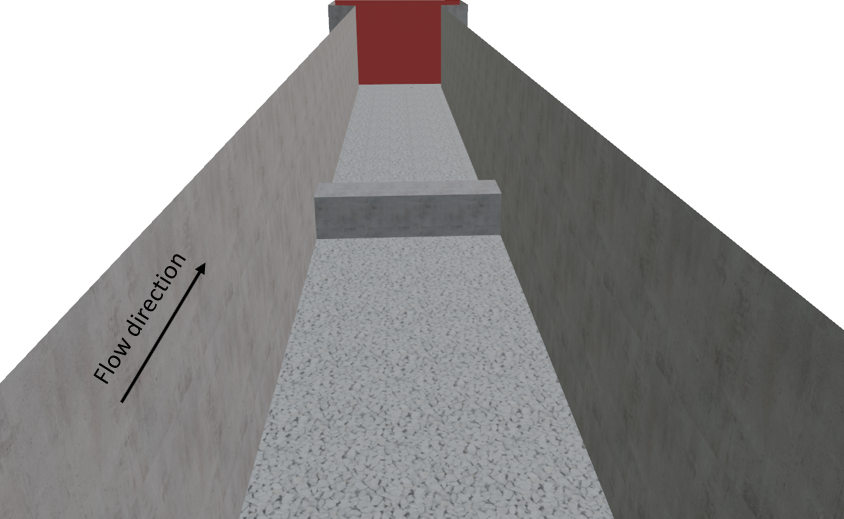
Figure 2:3D view of the analyzed structure in the flow direction highlighting the assigned materials.
The case folder containing all the necessary files can be downloaded here.
File Import
The first section of this tutorial will be dealing with the import of the initially created geometry. All files were created using Blender, which is a free and open-source 3D computer graphics software tool set. The geometry was divided into individual elements based on their composing material and according to the areas to be refined in the meshing process. Therefore, for the present example, the following elements were exported as STL files:
Air.stl
Concrete-sides.stl
Gravel-bottom.stl
Inlet.stl
Obstacle.stl
Outlet.stl
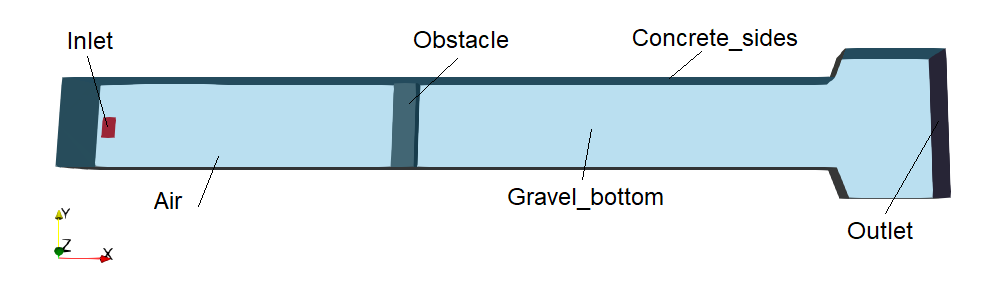
Figure 3:Constituent elements of the channel.
When exporting the STL files from Blender, select the option Ascii and include only the selected object, as shown below.
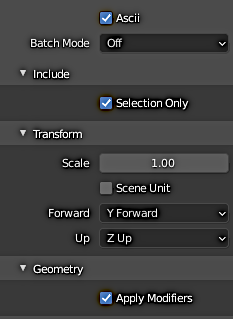
Figure 4:Settings for the export of the STL files from Blender.
Next, before proceeding with the mesh generation, the exported STL files need to be opened with a text editor and the first and final line need to be modified as follows:
Substitute
solid Exported from Blender-2.93.3
...
endsolid Exported from Blender-2.93.3
with the name of the STL files you are dealing with, for example:
solid Gravel-bottom
...
endsolid Gravel-bottom
Finally, all the exported and edited STL files can be saved in the triSurface folder that will be described more in detail in the next section.