The Concept
git is a fast, scalable, distributed revision (version) control system, originally developed by Linus Torvalds (read more about the git kernel). git enables coordinating work among collaborators beyond programming, in any set of files. Its support of non-linear workflows, speed, and data integrity makes git an indispensable tool in many industries and research. Before starting to read this git tutorial, have a look at the schematic functioning of repositories hosted with git.
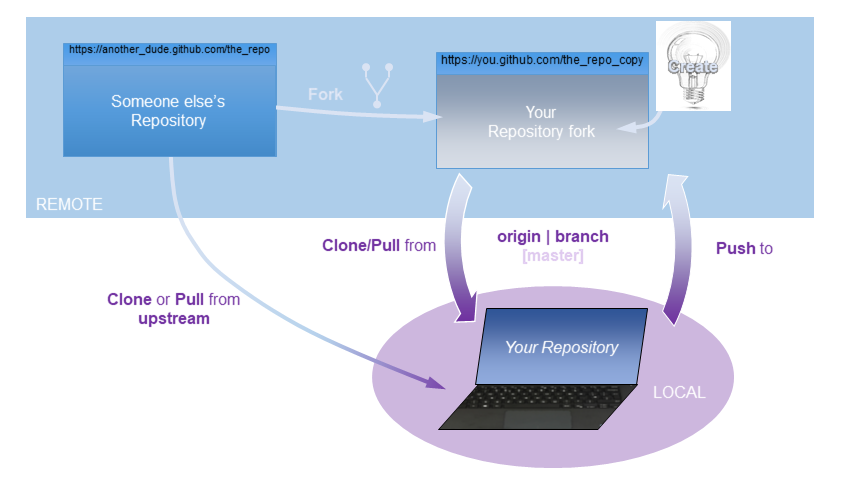
The concept of git and basic vocabulary. The REMOTE frame is online (i.e., someone else’s computer) and the LOCAL frame is what happens on a personal computer, which is connected to the internet. Repositories can be newly created or forked remotely. Remote repositories can be cloned locally, modified locally, and local changes can be pushed to a remote repository. Collaborators want to make sure to regularly pull changes of a remote repository. Working with and on different branches becomes increasingly important with the number of developers (see the section on collaboration and branches below) and for the moment we just need to remember that we start working in the main branch (i.e., upstream origin / HEAD = main).
Install git
The materials provided with this eBook are best downloaded and updated using git-able environments (avoid downloading materials as zip file).
Although git is an integral feature of most Linux distributions, Debian users might still need to install it. For this purpose, open Terminal and tap:
sudo apt install gitDownload and install Git Bash and use it together with an IDE such as PyCharm’s Community Edition or VS Code.
macOS users may use Homebrew for installing git, but there are other options, such as Xcode.
To use Homebrew for installing git, start with installing Homebrew through the macOS Terminal:
/bin/bash -c "$(curl -fsSL https://raw.githubusercontent.com/Homebrew/install/HEAD/install.sh)"The installation of Homebrew may take a while. After the installation, make sure to export the required PATH variable (copy line-by-line):
echo 'eval $(/opt/homebrew/bin/brew shellenv)' >> /Users/$USER/.zprofile
eval $(/opt/homebrew/bin/brew shellenv)
It might be possible that the paths in the above commands need to be adapted to the directories that the Homebrew installer prompts at the end of its installation.
Finally, install git with Homebrew:
brew install gitUltimately, Homebrew provides many more packages, which are essentially useful for developers, such as ruby or React (go to the full package list).
Read more installation instructions and about options for git on macOS at https://
The repositories for this course are mainly hosted on GitHub. There are many other git service providers out there, such as GitLab, plan.io, or BitBucket.
Create a Repository
To create a git repository, make sure to have access to a git provider. The most popular way to get access to a git-able server is to register with one on the long list of popular git providers.
Clone (Download) a Repository
GitHub provides detailed descriptions and standard procedures to work with their repositories (read more). The following “recipe” guides through the first-time download of git materials:
Open your favorite git-able command line:
Windows Options: PowerShell, Git Bash, or Command Prompt
Linux: Terminal
Clone the course repository (change materials according to the course attended):
git clone https://github.com/hydro-informatics/materials(or whatever repository you want to clone)
Done.
Pull (Update/Re-Download) a Local Repository
git (within Git Bash, PyCharm, or Terminal) is the only option to update local copies of a remote repository consistently. To do so, open one of the above-mentioned git-able command lines and do the following:
Go to the local directory of the repository with the
cdcommand (e.g.,materials):
cd "D:/Python/materials/"(or wherevermaterialswas cloned).git status- shows the modifications made.Merge conflicts may occur when changes were made in the local copy. To keep the local history linear, type:
git pull --rebase- if locally edited files were modified remotely since the last pull, git will highlight problematic (conflicting) sections with<<<<<<<,=======, and>>>>>>>markers. Manually open the concerned files, resolve the conflicts, and delete the invalid conflict markers. Then mark the files as resolved withgit add FILENAMEand finalize withgit rebase --continue.
Done.
Update a Remote Repository (Push Local Changes)
After editing files in a repository locally, add - commit - push (in that order) your edits to the remote copy of the repository with version control. To add - commit - push local changes to a remote repository, make sure to be the remote repository owner or a contributor. Then open a git-able terminal and type:
git status- this shows the modifications made.If the status only lists consciously made changes, type
git add .
Alternatively, if only single files were changed, usegit add filename.pyinstead. Best practice: exclude files that should never be tracked (e.g., temporary or large binary files) with a local .gitignore file.Commit the changes with
git commit -m "Leave a message"- leave a significant and precise short message (e.g.,"fix typos in flow calculator").git pull --rebase- if locally edited files were modified remotely since the last pull, git will highlight problematic (conflicting) sections with<<<<<<<,=======, and>>>>>>>markers. Manually open the concerned files, resolve the conflicts, delete the invalid conflict markers, then rungit add FILENAMEandgit rebase --continue.git push
If any error occurs, carefully read why the error occurred and follow the instructions for troubleshooting (e.g., for setting up your user configuration with git config --global user.email “email@example.com”). You may ignore warning messages regarding line-end formats (WARNING ... LF endings ...) for most applications presented in this eBook.
Collaboration & Branches
As soon as more than one person works on a repository (or one person works on more than one feature), committing everything directly to the main branch becomes error-prone. Best practice is to keep main always in a working state and to develop new features, fixes, or experiments on dedicated branches. A branch is an independent line of development that starts as a copy of another branch (typically main) and can later be merged back.
Create a Branch
To create a new branch and switch to it, open a git-able terminal in the local repository and type:
git switch main- make sure to start from themainbranch (older git versions requiregit checkout main).git pull- update the localmainbranch to avoid branching off an outdated state.git switch -c fix-hydraulics-chapter- create and directly switch to a new branch (here calledfix-hydraulics-chapter; older git versions requiregit checkout -b fix-hydraulics-chapter). Use short, descriptive branch names, such asfix-typos-git-chapterorfeature-sediment-transport.
git branch lists all local branches and marks the currently active branch with a *. Switch between existing branches with git switch BRANCH-NAME.
Modify (Work on) a Branch
Working on a branch is exactly the same add - commit - push workflow as described in the Update a Remote Repository (Push Local Changes) section, with one difference: the first push must tell the remote repository about the new branch. Thus:
Edit files, then
git statusandgit add .(orgit add filename.py).git commit -m "Leave a message"- commit small, coherent units of work rather than one giant commit at the end.git push -u origin fix-hydraulics-chapter- the-u(upstream) flag links the local branch to the remote branch, so that all later updates only require a plaingit push.
To keep a long-living branch up to date with ongoing developments in main, regularly type (with the feature branch active):
git fetch origin
git merge origin/main
Resolve possible conflicts as described in the Pull (Update/Re-Download) a Local Repository section (here, conclude with git commit rather than git rebase --continue).
Comment and Review (Pull Requests)
Directly merging an own branch without any review works for solo projects, but in a team, best practice is to open a pull request (called merge request on GitLab). A pull request is a proposal to merge one branch into another and constitutes the central place for commenting on code:
Push the branch to the remote repository (see above).
On GitHub, the repository page will suggest Compare & pull request for recently pushed branches. Alternatively, go to the Pull requests tab and click on New pull request, then select
mainas base and the feature branch (e.g.,fix-hydraulics-chapter) as compare.Give the pull request a precise title and describe what was changed and why. Request a review from one or more collaborators (right menu on GitHub).
Reviewers can comment on the pull request as a whole (Conversation tab) or on individual lines of code (Files changed tab, hover over a line and click the
+symbol). Line comments may also be bundled into a formal review with the verdicts Comment, Approve, or Request changes.To address review comments, simply commit and push new changes to the same branch. The pull request updates automatically, and resolved discussions can be marked as such with the Resolve conversation button.
Merge a Development Branch into main
Once the pull request is approved (and automated checks pass, if configured), apply the new developments to main by clicking the Merge pull request button on GitHub. In addition, GitHub offers Squash and merge (combines all branch commits into a single commit, which keeps the history of main tidy) and Rebase and merge. After merging, delete the branch remotely (GitHub suggests a Delete branch button) and locally:
git switch main
git pull
git branch -d fix-hydraulics-chapter
Without a git provider interface (e.g., for a purely local repository), a branch can also be merged manually:
git switch main- switch to the target branch.git pull- make sure the localmainbranch is up to date (skip for purely local repositories).git merge fix-hydraulics-chapter- merge the development branch intomain. Resolve possible conflicts (see the Pull (Update/Re-Download) a Local Repository section), thengit addthe resolved files andgit commit.git push- publish the updatedmainbranch.git branch -d fix-hydraulics-chapter- delete the merged branch (git refuses to-d-delete branches with unmerged changes, which is a useful safety net).
Done.