Get ready by cloning the exercise repository:
git clone https://github.com/Ecohydraulics/Exercise-SedimentTransport.git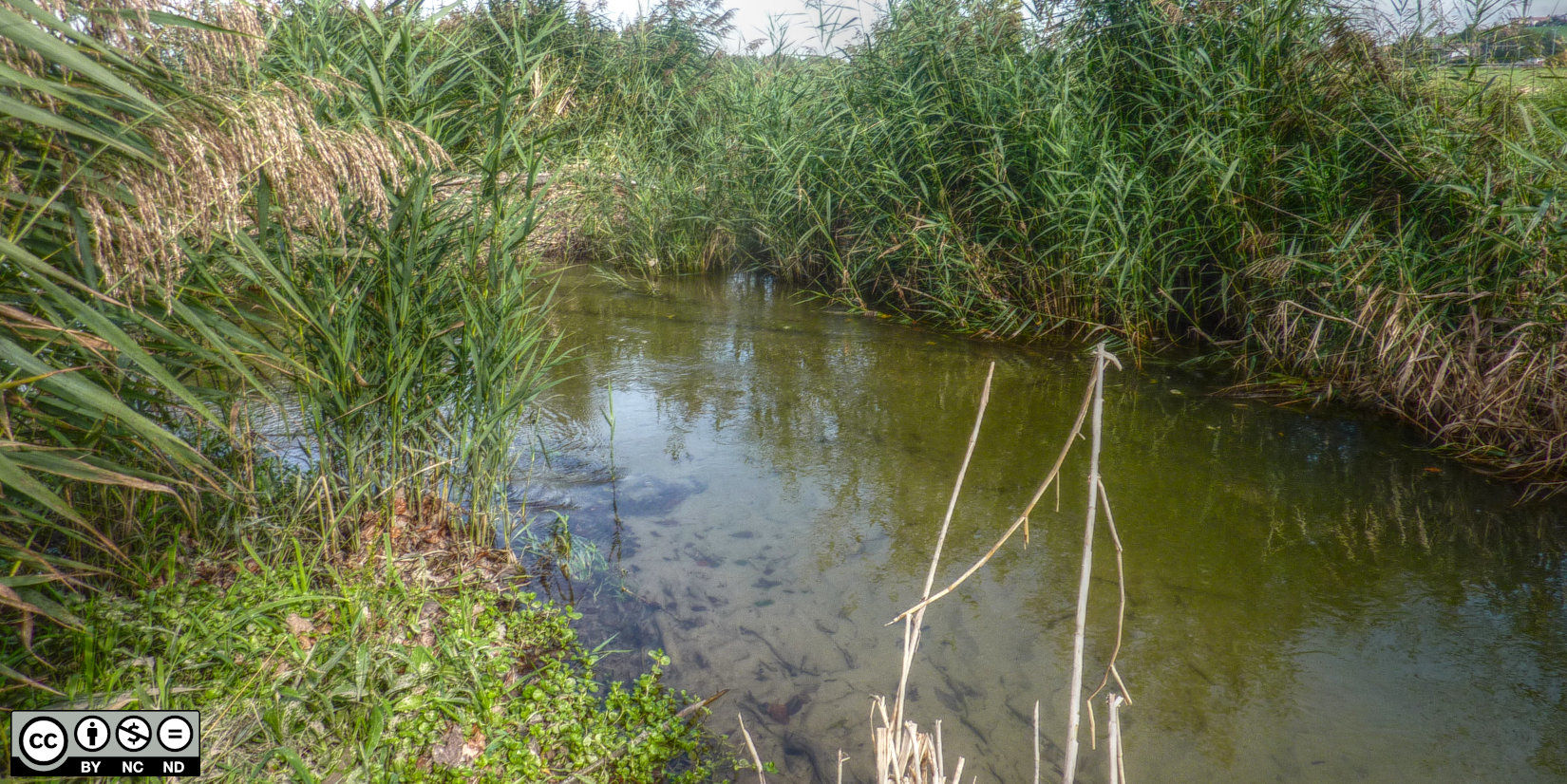
Figure 1:The Arbogne River in Switzerland (source: Sebastian Schwindt 2013).
Theory
1d Cross-Section Averaged Hydrodynamics
From the stage-discharge (Manning-Strickler formula) exercise, we recall the formula to calculate the relationship between water depth (incorporated in the hydraulic radius ) and flow velocity :
where
is the Manning coefficient in fictional units of (s/m).
is the hypothetical energy slope (m/m) and corresponds to the channel slope for steady, uniform flow conditions (non-existing in natural rivers).
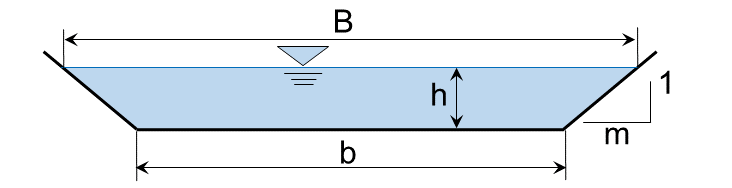
hydraulic radius , where (for a trapezoidal cross-section):
the wetted (trapezoidal) cross-section area is ;
the wetted perimeter of a trapezoid is ;
(channel base width) and (bank slope) are illustrated in the figure below to calculate the depth-dependent water surface width .
This exercise uses one-dimensional (1d) cross-section averaged hydraulic data produced with the US Army Corps of Engineers HEC-RAS software U.S. Army Corps of Engineeers, 2016, which solves the Manning-Strickler formula numerically for any flow cross-section shape. In this exercise, HEC-RAS provides the hydraulic data needed to determine the sediment transport capacity of a channel cross-section, although no explanations for creating, running, and exporting data from HEC-RAS models are given.
Sediment Transport
Fluvial Sediment transport can be distinguished into two modes: (1) suspended load and (2) bedload (see Fig. 3). Finer particles with a weight that can be carried by the fluid (water) are transported as suspended load. Coarser particles rolling, sliding, and jumping on the channel bed are transported as bedload. There is another type of transport, the so-called wash load, which is finer than the coarse bedload, but too heavy (large) to be transported in suspension Einstein, 1950.
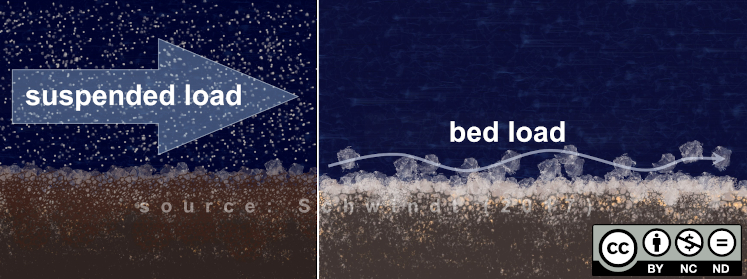
Figure 3:Two modes of sediment transport (source: Schwindt, 2017).
In the following, we will look at the bedload transport mode. In this case, a sediment particle located in or on the riverbed is mobilized by shear forces of the water as soon as they exceed a critical value (see figure below). In river hydraulics, the so-called dimensionless bed shear stress or Shields stress Shields, 1936 is often used as the threshold value for the mobilization of sediment from the riverbed (see Fig. 4). This exercise uses one of the dimensionless bed shear stress approaches and the next section provides more explanations.
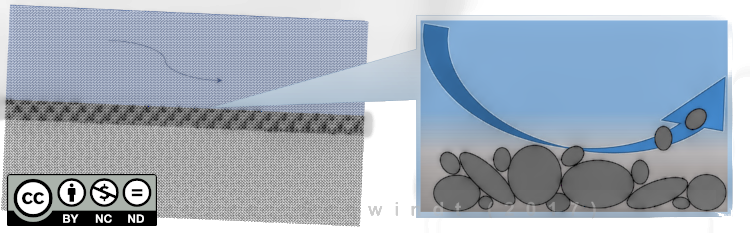
Figure 4:The principle of sediment mobilization.
The Meyer-Peter and Müller (1948) Formula
The Meyer-Peter & Müller (1948) formula for estimating bedload transport was published by Swiss researchers Eugen Meyer-Peter (founder of the Laboratory of Hydraulics, Hydrology and Glaciology (VAW) and Robert Müller. Their study began one year after the establishment of the VAW in 1931 when Robert Müller was appointed assistant to Eugen Meyer-Peter. The two scientists worked in collaboration with Henry Favre and Albert Einstein’s son Hans Albert. In 1934, the laboratory published for the first time a formula for the calculation of bedload transport and its fundamental relationship between observed and critical dimensionless bed shear stresses is used until today. The dimensionless bedload transport rate according to Meyer-Peter & Müller (1948) is:
The other parameters are:
2.68, the dimensionless ratio of sediment grain density ( 2680 kg/m³) and water density ( 1000 kg/m³);
, the characteristic grain size in (m). It can be assumed that (i.e., the grain diameter of which 84% of a sediment mixture is smaller) in line with the scientific literature (e.g., Rickenmann & Recking (2011)).
The Meyer-Peter & Müller formula applies (like any other Sediment transport formula) only to certain rivers that have the following characteristics (range of validity):
0.4 10 m < 28.6 10 m
10 m 639 ( denotes the dimensionless Froude number)
0.0004 0.02
0.0002 m/(s m) 2.0 m/(s m) ( is the unit discharge, i.e., )
0.25 3.2
The dimensionless expression for bedload was used to enable information transfer between different channels across scales by preserving geometric, kinematic, and dynamic similarity. The set of dimensionless parameters used results from Buckingham’s theorem Buckingham, 1915. Therefore, to add dimensions to , it needs to be multiplied with the same set of parameters used for deriving the dimensionless expression from Meyer-Peter & Müller. Their set of parameters involves the characteristic grain size , the grain density , and the gravitational acceleration . Thus, the dimensional unit bedload is (in kg/s and meter width, i.e., kg/(sm):
The cross-section averaged bedload (kg/s) is then:
where is the hydraulically active channel width of the flow cross-section (e.g., for a trapezoid ).
Code
Set the Frame
The object-oriented code will use custom classes that we will call within a main.py script. Create the following additional scripts, which will contain the custom classes and functions to control logging.
fun.pywill contain logging functions.hec.pywill contain aHecSetclass to read hydraulic output data from HEC-RAS as structured objects.grains.pywill contain aGrainReaderclass to read grain size class information as structured objects.bedload.pywill contain the classBedCorewith basic elements that most bedload formulae have in common.mpm.pywill contain the classMPM, which inherits fromBedCoreand calculates bedload as above described (Meyer-Peter & Müller 1948).
We will create the classes and functions in the indicated scripts according to the following flow chart:
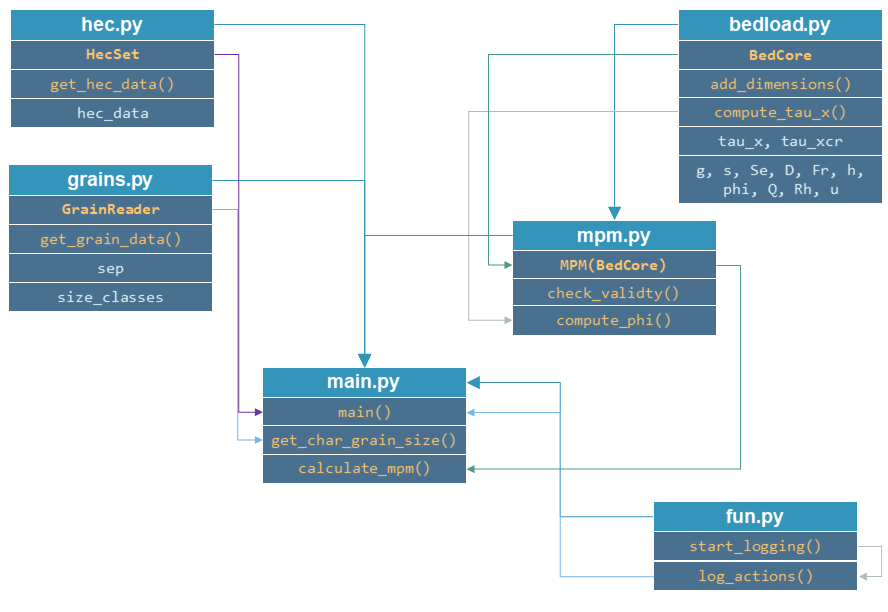
To start with the main.py script, add a main function as well as a get_char_grain_size and a calculate_mpm function. Moreover, make the script stand-alone executable:
# This is main.py
import os


def get_char_grain_size(file_name, D_char):
    return None


def calculate_mpm(hec_df, D_char):
    return None


def main():
    pass


if __name__ == '__main__':
    main()
Logging Functions
The fun.py script will contain two functions:
start_loggingto setup logging formats and a log file name as described in the section on logging, andlog_actions, which is a function wrapper for themain()(main.py) functions to log script execution messages.
The start_logging function should look like this (change the log file name if desired):
import logging


def start_logging():
    logging.basicConfig(filename="logfile.log", format="[%(asctime)s] %(message)s",
                        filemode="w", level=logging.DEBUG)
    logging.getLogger().addHandler(logging.StreamHandler()
The log_actions wrapper function follows the instructions from the functions theory section:
def log_actions(fun):
    def wrapper(*args, **kwargs):
        start_logging()
        fun(*args, **kwargs)
        logging.shutdown()
    return wrapper
To use the log_actions wrapper throughout the program, we will implement it at the highest level, which is the main() function in main.py:
# main.py
from fun import *

...

@log_actions
def main():
    logging.info("This is a test message (do not keep in the function).")


if __name__ == '__main__':
    main()
Now, we can log messages at different levels (info, warning, error, or others) in all functions called within main() by using for example logging.info("Message"), logging.warning("Message"), or logging.error("Message") rather than the print() function.
Read Grain Size Data
Sediment grain size classes (ranging from to ) are provided in the file grains.csv (delimiter=",") and can be customized.
Write a GrainReader class that uses the read_csv method from Pandas to read the grain size distribution from grains.csv. Write the class in a separate Python script (e.g., grains.py as indicated in the above figure):
class GrainReader:
    def __init__(self, csv_file_name="grains.csv", delimiter=","):
        self.sep = delimiter
        self.size_classes = pd.DataFrame
        self.get_grain_data(csv_file_name)
The get_grain_data method should look like this for reading the provided grain size classes:
    def get_grain_data(self, csv_file_name):
        self.size_classes = pd.read_csv(csv_file_name,
                                        names=["classes", "size"],
                                        skiprows=[0],
                                        sep=self.sep,
index_col=["classes"])Implement the instantiation of a GrainReader object in the main.py script in the get_char_grain_size function. The function should receive the string-type arguments file_name (here: "grains.csv") and D_char (i.e., the characteristic grain size to use from grains.csv). The main() function calls the get_char_grain_size function with the arguments file_name=os.path.abspath("..") + "\\grains.csv" and D_char="D84" (corresponds to the first column in grains.csv).
# main.py
import os
from grains import GrainReader

def get_char_grain_size(file_name=str, D_char=str):
    grain_info = GrainReader(file_name)
    return grain_info.size_classes["size"][D_char]

...

@log_actions
def main():
    # get characteristic grain size = D84
    D_char = get_char_grain_size(file_name=os.path.abspath("..") + "\\grains.csv",
                                 D_char="D84")
Read HEC-RAS Input Data
The provided HEC-RAS dataset is stored in the xlsx workbook HEC-RAS/output.xlsx and contains the following output:
| Col.No. | Alphabetic Col. | Variable | Type/Unit | Description |
|---|---|---|---|---|
| Col. 01 | A | Reach | string | River (reach) name |
| Col. 02 | B | River Sta | [m] | Position on the longitudinal river axis |
| Col. 03 | C | Profile | string | Name of flow scenario profile (e.g., HQ2.33) |
| Col. 04 | D | Q Total | [m³/s] | River discharge |
| Col. 05 | E | Min Ch El | [m a.s.l.] | Minimum elevation (level) of channel cross-section |
| Col. 06 | F | W.S. Elev | [m a.s.l.] | Water surface elevation (level) |
| Col. 07 | G | Vel Chnl | [m] | Flow velocity main channel |
| Col. 08 | H | Flow Area | [m²] | Wetted cross-section area A (see above) |
| Col. 09 | I | Froude# Chl | [-] | Froude number of the channel (if 1, computation error - do not use!) |
| Col. 10 | J | Hydr Radius | [m] | Hydraulic radius |
| Col. 11 | K | Hydr Depth | [m] | Water depth (active cross-section average) |
| Col. 12 | L | E.G. Slope | [m/m] | Energy Gradeline slope |
To load HEC-RAS output data, write a custom class (in a separate script called hec.py) that takes the file name as input argument and reads the HEC-RAS file as pandas data frame:
class HecSet:
    def __init__(self, xlsx_file_name="output.xlsx"):
        self.hec_data = pd.DataFrame
        self.get_hec_data(xlsx_file_name)
The get_hec_data method should look (something) like this:
    def get_hec_data(self, xlsx_file_name):
        self.hec_data = pd.read_excel(xlsx_file_name,
                                      skiprows=[1],
                                      header=[0])
To create a HecSet object in the main() (main.py) function, we need to import and instantiate it for example as hec = HecSet(file_name). In addition, we can already implement passing the pd.DataFrame of the HEC-RAS data to the calculate_mpm function (also in main.py) that we will complete later on.
# main.py
import os
from ...
from hec import HecSet

...

@log_actions
def main():
    D_char = ...

    hec_file = os.path.abspath("..") + "{0}HEC-RAS{0}output.xlsx".format(os.sep)
    hec = HecSet(hec_file)
Create a Bedload Core Class
A BedCore class written in the bedload.py script provides variables and methods, which are relevant to many bedload and Sediment transport calculation formulae, such as the Parker-Wong correction Wong & Parker, 2006 or the Smart & Jaeggi (1983) (direct download ). Moreover, the BedCore class contains constants such as the gravitational acceleration (i.e., self.g=9.81), the ratio of sediment grain and water density (i.e., self.s=2.68), and the critical dimensionless bed shear stress (i.e., self.tau_xcr=0.047, which may be re-defined by users). The header of the BedCore class should look (similar) like this:
from fun import *
import numpy as np


class BedCore:
    def __init__(self):
        self.tau_x = np.nan
        self.tau_xcr = 0.047
        self.g = 9.81
        self.s = 2.68
        self.rho_s = 2680.0  # kg/m3 sediment grain density
        self.Se = np.nan  # energy slope (m/m)
        self.D = np.nan  # characteristic grain size
        self.Fr = np.nan  # Froude number
        self.h = np.nan  # water depth (m)
        self.phi = np.nan  # dimensionless bedload
        self.Q = np.nan  # discharge (m3/s)
        self.Rh = np.nan  # hydraulic radius (m)
self.u = np.nan # flow velocity (m/s)Add a method to convert the dimensionless bedload transport into a dimensional value (kg/s). In addition to the variables defined in the __init__ method, the add_dimensions method will require the effective channel width (recall the above calculus):
    def add_dimensions(self, b):
        try:
            return self.phi * b * np.sqrt((self.s - 1) * self.g * self.D ** 3) * self.rho_s
        except ValueError:
            logging.warning("Non-numeric data. Returning Qb=NaN.")
            return np.nan
Many bedload transport formulae involve the dimensionless bed shear stress [ (see above definitions) associated with a set of cross-section averaged hydraulic parameters. Therefore, implement the calculation method compute_tau_x in BedCore:
    def compute_tau_x(self):
        try:
            return self.Se * self.Rh / ((self.s - 1) * self.D)
        except ValueError:
            logging.warning("Non-numeric data. Returning tau_x=NaN.")
            return np.nan
Write a Meyer-Peter & Müller Bedload Assessment Class
Create a new script (e.g., mpm.py) and implement an MPM class (Meyer-Peter & Müller) that inherits from the BedCore class. The __init__ method of MPM should initialize BedCore and overwrite (recall Polymorphism) relevant parameters to the calculation of bedload according to Meyer-Peter & Müller (1948). Moreover, the initialization of an MPM object should go along with a check of the validity and the calculation of the dimensionless bedload transport (see above explanations of MPM):
from bedload import *


class MPM(BedCore):
    def __init__(self, grain_size, Froude, water_depth,
                 velocity, Q, hydraulic_radius, slope):
        # initialize parent class
        BedCore.__init__(self)
        # assign parameters from arguments
        self.D = grain_size
        self.h = water_depth
        self.Q = Q
        self.Se = slope
        self.Rh = hydraulic_radius
        self.u = velocity
        self.check_validity(Froude)
        self.compute_phi()
Add the check_validity method to verify if the provided cross-section characteristics fall into the range of validity of the Meyer-Peter & Müller formula (i.e., slope, grain size, ratio of discharge and water depth, and Froude number):
    def check_validity(self, Fr):
        if (self.Se < 0.0004) or (self.Se > 0.02):
            logging.warning('Warning: Slope out of validity range.')
        if (self.D < 0.0004) or (self.D > 0.0286):
            logging.warning('Warning: Grain size out of validity range.')
        if ((self.u * self.h) < 0.002) or ((self.u * self.h) > 2.0):
            logging.warning('Warning: Discharge out of validity range.')
        if (self.s < 0.25) or (self.s > 3.2):
            logging.warning('Warning: Relative grain density (s) out of validity range.')
        if (Fr < 0.0001) or (Fr > 639):
logging.warning('Warning: Froude number out of validity range.')To calculate dimensionless bedload transport according to Meyer-Peter & Müller, implement a compute_phi method that uses the compute_tau_x method from BedCore:
   def compute_phi(self):
        tau_x = self.compute_tau_x()
        try:
            if tau_x > self.tau_xcr:
                self.phi = 8 * (0.85 * tau_x - self.tau_xcr) ** (3 / 2)
            else:
                self.phi = 0.0
        except TypeError:
            logging.warning("Could not calculate PHI (result=%s)." % str(tau_x)
            self.phi = np.nan
With the MPM class defined, we can now fill the calculate_mpm function in the main.py script. The function should create a pandas data frame with columns of dimensionless bedload transport and dimensional bedload transport associated with a channel profile ("River Sta") and flow scenario ("Profile" > "Scenario").
The following code block illustrates an example of the calculate_mpm function that creates the pandas data frame from a Dictionary (mpm_dict). The illustrative function creates the dictionary with void value lists, extracts hydraulic data from the HEC-RAS data frame, and loops over the "River Sta" entries. The loop checks if the "River Sta" entries are valid (i.e., not "Nan") because empty rows that HEC-RAS automatically adds between output profiles should not be analyzed. If the check was successful, the loop appends the profile, scenario, and discharge directly to mpm_dict. The section-wise bedload transport results from MPM objects. After the loop, the function returns mpm_dict as a pd.DataFrame object.
# main.py
from ...
from ...
from mpm import *

...

def calculate_mpm(hec_df, D_char):
    # create dictionary with relevant information about bedload transport with void lists
    mpm_dict = {
            "River Sta": [],
            "Scenario": [],
            "Q (m3/s)": [],
            "Phi (-)": [],
            "Qb (kg/s)": []
    }

    # extract relevant hydraulic data from HEC-RAS output file
    Froude = hec_df["Froude # Chl"]
    h = hec_df["Hydr Depth"]
    Q = hec_df["Q Total"]
    Rh = hec_df["Hydr Radius"]
    Se = hec_df["E.G. Slope"]
    u = hec_df["Vel Chnl"]

    for i, sta in enumerate(list(hec_df["River Sta"]):
        if not str(sta).lower() == "nan":
            logging.info("PROCESSING PROFILE {0} FOR SCENARIO {1}".format(str(hec_df["River Sta"][i]), str(hec_df["Profile"][i]))
            mpm_dict["River Sta"].append(hec_df["River Sta"][i])
            mpm_dict["Scenario"].append(hec_df["Profile"][i])
            section_mpm = MPM(grain_size=D_char,
                              Froude=Froude[i],
                              water_depth=h[i],
                              velocity=u[i],
                              Q=Q[i],
                              hydraulic_radius=Rh[i],
                              slope=Se[i])
            mpm_dict["Q (m3/s)"].append(Q[i])
            mpm_dict["Phi (-)"].append(section_mpm.phi)
            b = hec_df["Flow Area"][i] / h[i]
            mpm_dict["Qb (kg/s)"].append(section_mpm.add_dimensions(b)
    return pd.DataFrame(mpm_dict)
Having defined the calculate_mpm() function, the call to that function from the main() function should now assign a Pandas data frame to the mpm_results variable. To finalize the script, write mpm_results to a workbook (e.g., "bed_load_mpm.xlsx") in the main() function:
# main.py
import os
from ...

...

def calculate_mpm(hec_df, D_char):
    ...

@log_actions
def main():
    ...

    mpm_results = calculate_mpm(hec.hec_data, D_char)
    mpm_results.to_excel(os.path.abspath("..") + os.sep + "bed_load_mpm.xlsx")
Launch and Debug
In your IDE, run the script (e.g., in PyCharm, right-click in the main.py script and click > Run 'main'). If the script crashes or raises error messages, trace them back, and fix the issues. Add try - except statements where necessary and recall the debugging instructions.
A successful run of main.py produces a bed_load_mpm.xlsx file that looks like this:
| River Sta | Scenario | Q (m3/s) | Phi (-) | Qb (kg/s) | |
|---|---|---|---|---|---|
| 0 | 1970.1 | Q mean | 1 | ||
| 1 | 1970.1 | HQ2.33 | 13 | 0.548377243 | 42.72291418 |
| 2 | 1970.1 | HQ5 | 17 | 0.682792055 | 54.58338633 |
| 3 | 1970.1 | HQ10 | 19 | 0.765834516 | 62.56010505 |
| 4 | 1970.1 | HQ100 | 25 | 0.905542967 | 77.92848176 |
| 5 | 1893.37 | Q mean | 1 | 0.193642263 | 5.075423967 |
| 6 | 1893.37 | HQ2.33 | 13 | 0.144406226 | 14.00424884 |
| 7 | 1893.37 | HQ5 | 17 | 0.203854633 | 20.40484039 |
| 8 | 1893.37 | HQ10 | 19 | 0.229078172 | 23.1352098 |
| 9 | 1893.37 | HQ100 | 25 | 0.297767546 | 31.25225316 |
| ... | ... | ... | ... | ... | ... |
The logfile should look similar to this:
[20XX-XX-XX 14:08:22,900] PROCESSING PROFILE 1970.1 FOR SCENARIO Q mean
[20XX-XX-XX 14:08:22,900] Warning: Discharge out of validity range.
[20XX-XX-XX 14:08:22,901] PROCESSING PROFILE 1970.1 FOR SCENARIO HQ2.33
[20XX-XX-XX 14:08:22,901] Warning: Discharge out of validity range.
[20XX-XX-XX 14:08:22,901] PROCESSING PROFILE 1970.1 FOR SCENARIO HQ5
[20XX-XX-XX 14:08:22,902] Warning: Discharge out of validity range.
[20XX-XX-XX 14:08:22,902] PROCESSING PROFILE 1970.1 FOR SCENARIO HQ10
[20XX-XX-XX 14:08:22,902] Warning: Discharge out of validity range.
[20XX-XX-XX 14:08:22,902] PROCESSING PROFILE 1970.1 FOR SCENARIO HQ100
[20XX-XX-XX 14:08:22,903] Warning: Discharge out of validity range.
[20XX-XX-XX 14:08:22,903] PROCESSING PROFILE 1893.37 FOR SCENARIO Q mean
[20XX-XX-XX 14:08:22,903] Warning: Discharge out of validity range.
[20XX-XX-XX 14:08:22,903] PROCESSING PROFILE 1893.37 FOR SCENARIO HQ2.33
[20XX-XX-XX 14:08:22,903] Warning: Discharge out of validity range.
[20XX-XX-XX 14:08:22,904] PROCESSING PROFILE 1893.37 FOR SCENARIO HQ5
[20XX-XX-XX 14:08:22,904] Warning: Discharge out of validity range.
[20XX-XX-XX 14:08:22,904] PROCESSING PROFILE 1893.37 FOR SCENARIO HQ10
[20XX-XX-XX 14:08:22,904] Warning: Discharge out of validity range.
[...]- U.S. Army Corps of Engineeers. (2016). Hydrologic Engineering Centers River Analysis System (HEC-RAS). U.S. Army Corps of Engineeers (USACE). http://www.hec.usace.army.mil/software/hec-ras/
- Einstein, H. A. (1950). The Bed-Load Function for Sediment Transport in Open Channel Flows. Technical Bulletin of the USDA Soil Conservation Service, 1026, 71. 10.22004/ag.econ.156389
- Schwindt, S. (2017). Hydro-morphological processes through permeable sediment traps [Thesis No. 7655, Laboratory of Hydraulic Constructions (LCH), Ecole Polytechnique fédérale de Lausanne (EPFL)]. 10.5075/epfl-thesis-7655
- Shields, A. (1936). Anwendung der Ähnlichkeitsmechanik und der Turbulenzforschung auf die Geschiebebewegung [Application of the similarity in mechanics and turbulence research on the mobility of bed load] (Vol. 26). Preußische Versuchsanstalt für Wasserbau und Schiffbau. http://resolver.tudelft.nl/uuid:61a19716-a994-4942-9906-f680eb9952d6
- Meyer-Peter, E., & Müller, R. (1948). Formulas for Bed-Load transport. IAHSR, Appendix 2, 2nd meeting, 39–65. http://resolver.tudelft.nl/uuid:4fda9b61-be28-4703-ab06-43cdc2a21bd7
- Rickenmann, D., & Recking, A. (2011). Evaluation of flow resistance in gravel-bed rivers through a large field data set. Water Resources Research, 47, W07538. 10.1029/2010WR009793
- Buckingham, E. (1915). Model experiments and the forms of empirical equations. Transactions of the American Society of Mechanical Engineers, 37, 263–296.
- Wong, M., & Parker, G. (2006). Reanalysis and Correction of Bed-Load Relation of Meyer-Peter and Müller Using Their Own Database. Journal of Hydraulic Engineering, 132(11), 1159–1168. 10.1061/(ASCE)0733-9429(2006)132:11(1159)
- Smart, G. M., & Jaeggi, M. N. R. (1983). Sedimenttransport in steilen Gerinnen [Sediment Transport on Steep Slopes]. Mitteilung Nr. 64 der Versuchsanstalt für Wasserbau, Hydrologie und Glaziologie an der Eidgenössischen Technischen Hochschule Zürich. https://ethz.ch/content/dam/ethz/special-interest/baug/vaw/vaw-dam/documents/das-institut/mitteilungen/1980-1989/064.pdf
- Schwindt, S., Negreiros, B., Mudiaga-Ojemu, B. O., & Hassan, M. A. (2023). Meta-Analysis of a Large Bedload Transport Rate Dataset. Geomorphology, 435, 108748. 10.1016/j.geomorph.2023.108748