Leverage the power of Python by writing new classes.
Run this notebook in your web browser: 
The link opens b09-classes.py as an interactive marimo notebook that runs entirely in your web browser, without installing anything.
Wait a moment until Python has loaded in the browser (this takes longer only at the first start).
Click the yellow run button (▶︎, bottom right) to run all cells.
Edit and re-run any code cell to experiment: marimo automatically updates all cells that depend on it.
Your edits remain in the browser tab only. To keep them, save the notebook through the menu (☰, top right) > Export… > Python.
Run this marimo notebook locally
To run b09-classes.py on your own machine, get it from the marimo
Clone the repository:
git clone https://github.com/sschwindt/marimo-python-course.gitInstall marimo:
pip install marimoIn the repository folder, start the notebook with
marimo edit b09-classes.py
Run this notebook with Jupyter
This page is also available as the Jupyter notebook b09-classes.ipynb in the jupyter , or install Python and JupyterLab locally to run b09-classes.ipynb on your own machine.
Watch this section as a video
Watch this section as a video on the @Hydro-Morphodynamics channel on YouTube.
The Class of Classes
Python is an inherently object-oriented language and makes the deployment of classes and objects extremely easy. This chapter introduces the concept of Python classes and starts with essential definitions.
What Is Object-Oriented Programming (OOP)?
Object-Oriented Programming (OOP) is a programming paradigm that aligns the architecture of software with reality. Object orientation starts with the design of software, where a structured model is established. The structured model contains information about objects and their abstractions. The development and implementation of object-oriented software require a structured way of thinking and a conceptual understanding of classes, inheritance, polymorphism, and encapsulation.
Objects and Classes
In computer language, an object is an instance that contains data in the form of fields (called attributes or properties) and code in the form of features (functions or methods). In Python, an object is an instance of a class. A class defines behavior and can act as a blueprint for its instances. Attributes store object state, and methods are functions defined on the class that operate on instances. By convention, an instance method’s first parameter is named self; Python supplies the instance for that argument when the method is called through an instance.
Classes themselves are objects and consume memory. A class may define __init__ to initialize a new instance, but an explicit __init__ method is not required.
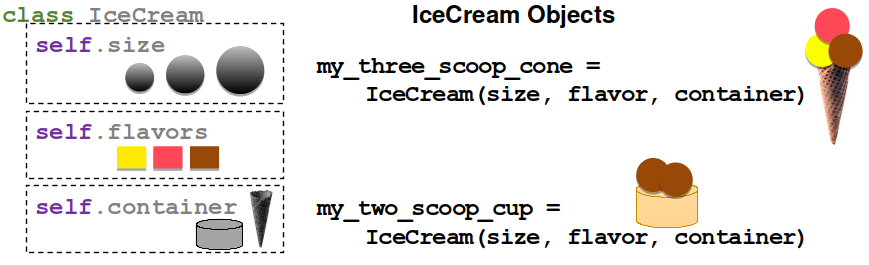
The simplest form of a class in Python includes a few fundamental statements only, and it is highly recommended to add an __init__ statement in which class variables are defined. We will come back to the __init__ statement later in the section on magic methods. The following example shows one of the simplest possible class structures with an __init__ method. Note the usage of self in the class, which becomes object_name.attribute for instances of the IceCream class.
class IceCream:
    def __init__(self, *args, **kwargs):
        self.flavors=["vanilla", "chocolate", "bread"]

    def add_flavor(self, flavor):
        self.flavors.append(flavor)

    def print_flavors(self):
        print(", ".join(self.flavors))

# create an instance of IceCream and use the print_flavors method
some_scoops = IceCream()
some_scoops.add_flavor("lemon")

# the following statements have similar effects
some_scoops.print_flavors()
print(some_scoops.flavors)
vanilla, chocolate, bread, lemon
['vanilla', 'chocolate', 'bread', 'lemon']
Inheritance
The Cambridge Dictionary defines inheritance (biology) as “particular characteristics received from parents through genes”. Similarly, inheritance in OOP describes the hierarchical relationship between classes with is-a-type-of relationships. For instance, a class called Salmon may inherit from a class called Fish. In this case, Fish is the parent class (or super-class) and Salmon is the child class (or sub-class), where Fish might define attributes like preferred_flow_depth or preferred_flow_velocity with fuzzification methods describing other habitat preferences. Such class inheritance could look like this:
# define the parent class Fish
class Fish:
  def __init__(self, *args, **kwargs):
        self.preferred_flow_depth = float()
        self.preferred_flow_velocity = float()
        self.species = ""
        self.xy_position = tuple()

  def print_habitat(self):
        print("The species {0} prefers {1}m deep and {2}m/s fast flowing waters.".format(self.species, str(self.preferred_flow_depth), str(self.preferred_flow_velocity)))

  def swim_to_position(self, new_position=()):
        self.xy_position = new_position


# define the child class Salmon, which inherits (is-a-type-of) from Fish
class Salmon(Fish):
  def __init__(self, species, *args, **kwargs):
	  super().__init__(*args, **kwargs)
	  self.family = "Salmonidae"
	  self.species = species


  def habitat_function(self, depth, velocity):
        self.preferred_flow_depth = depth
        self.preferred_flow_velocity = velocity

atlantic_salmon = Salmon("Salmo salar")
atlantic_salmon.habitat_function(depth=0.4, velocity=0.5)
atlantic_salmon.print_habitat()

pacific_salmon = Salmon("Oncorhynchus tshawytscha")
pacific_salmon.habitat_function(depth=0.6, velocity=0.8)
pacific_salmon.print_habitat()
The species Salmo salar prefers 0.4m deep and 0.5m/s fast flowing waters.
The species Oncorhynchus tshawytscha prefers 0.6m deep and 0.8m/s fast flowing waters.
Polymorphism
Polymorphism allows different object types to support the same interface. A subclass that overrides an inherited method is one example. Python also commonly uses duck typing: unrelated classes can be used through the same operation when they provide the required methods or attributes. For instance, polymorphism in Python is when we re-define the swim_to_position function of the above-shown Fish parent class in the Salmon child class.
Encapsulation (Public and Non-public Attributes)
The concept of encapsulation combines data and functions to manipulate data, whereby both (data and functions) are protected against external interference and manipulation. Encapsulation is also the baseline of data hiding in computer science, which segregates design decisions in software regarding objects that are likely to change.
One of the most important aspects of encapsulation is the differentiation between private and public class variables. A private attribute cannot be modified from outside (i.e., it is protected and cannot be changed for an instance of a class). Python does not enforce truly private instance attributes. A name such as _family is non-public by convention. A name such as __family is name-mangled to include the class name, mainly to reduce accidental clashes in subclasses; it can still be accessed deliberately. Properties can provide managed read, write, and delete behavior through getter, setter, and deleter functions.
In the above example of the Salmon class, we use a public variable called self.family. However, the family attribute of the Salmon class is an attribute that should not be modifiable. Similar behavior would be desirable for an attribute called self.aggregate_state = "frozen" of the IceCream class. To familiarize with the concept, the following code block defines another child of the Fish class with a non-public __family attribute. The __family attribute is not directly accessible for instances of the new child class called Carp. Still, we want the Carp class to have a family attribute and we want to be able to print its value. This is why we need a special method def family(self), which has the same name as the protected attribute and an @property decorator. The below example features an additional special method called def family(self, value) that is embraced with a @property.setter decorator and that enables re-defining the non-public __family property (even though this is logically nonsense because we do not want to enable renaming the __family property).
class Carp(Fish):
    def __init__(self, species, *args, **kwargs):
        Fish.__init__(self)
        self.__family = "cyprinidae"
        self.species = species

    @property
    def family(self):
        return self.__family

    @family.setter
    def family(self, value):
        self.__family = value
        print("family set to \'%s\'" % self.__family)


european_carp = Carp("Cyprinus carpio carpio")
print(european_carp.family)

try:
    print(european_carp.__family)
except AttributeError:
    print("__family is not directly accessible.")

# re-definition of __family through @family.setter method
european_carp.family="lamnidae"
cyprinidae
__family is not directly accessible.
family set to 'lamnidae'
Decorators
The @property decorator defines a getter, so european_carp.family reads the value returned by the method. The @family.setter decorator defines what happens when client code executes an assignment such as european_carp.family = "Lamnidae".
Until here, we only know decorators as an efficient way to simplify functions. However, decorators are an even more powerful tool in object-oriented programming of classes, in which decorators can be used to wrap class methods similar to functions. Let’s define another child of the Fish class to explore the @property decorator with its deleter, getter, and setter methods.
class Bullhead(Fish):
  def __init__(self, species, *args, **kwargs):
	  Fish.__init__(self)
	  self.__family = "cottidae"
	  self.species = species
	  self.__length = 7.0

  @property
  def length(self):
	  return self.__length

  @length.setter
  def length(self, value):
	  try:
		  self.__length = float(value)
	  except (TypeError, ValueError):
		  print("Error: Value is not a real number.")

  @length.deleter
  def length(self):
	  del self.__length

# Read through the getter, assign through the setter, and delete through the deleter


european_bullhead = Bullhead("Cottus gobio")

# make use of @property.getter, which directly results from the @property-embraced def length method
print(european_bullhead.length)

# make use of @property.setter method
european_bullhead.length = 6.5
print(european_bullhead.length)

# make use of @property.delete method
del european_bullhead.length
try:
    print(european_bullhead.length)
except AttributeError:
    print("Error: You cannot print a nonexistent property.")
7.0
6.5
Error: You cannot print a nonexistent property.
Overloading and Magic Methods
The above examples introduced a special or magic method called __init__. We have already seen that __init__ is nothing magical itself and there are many more of such predefined methods in Python. Before we get to magic methods, it is important to understand the concept of overloading in Python. Did you already wonder why the same operator can have different effects depending on the data type? For instance, the + operator concatenates strings, but sums up numeric data types:
a_string = "vanilla"
b_string = "cream"
print("+ operator applied to strings: " + str(a_string + b_string))

a_number = 50
b_number = 30
print("+ operator applied to integers: " + str(a_number + b_number))
+ operator applied to strings: vanillacream
+ operator applied to integers: 80
This behavior is called operator (or function) overloading in Python and overloading is possible because of pre-defined names of magic methods in Python. Now, we are ready to dive into the magic methods pool.
Magic methods are one of the key elements that make Python easy and clear to use. Because of their declaration using double underscores (__this_is_magic__), magic methods are also called dunder (double underscore) methods. Magic methods are special methods with fixed names and their magic name is because they do not need to be directly invoked. Behind the scenes, Python constantly uses magic methods, for example, when a new instance of a class is assigned: When var = MyClass() is evaluated, Python calls MyClass.__new__ to create an instance. If __new__ returns an instance of MyClass, Python then calls MyClass.__init__ to initialize it. For a + b, Python first tries a.__add__(b); if that returns NotImplemented, Python may try the reflected operation b.__radd__(a) before raising TypeError.
The following sections list some documented magic methods for use in classes and packages. These are only some of the most common magic methods and more documented magic objects or attributes exist.
Operator (Binary) and Assignment Methods
For any new class that we want to be able to deal with an operator (e.g., to enable summing up objects with result = object1 + object2), we need to implement (overload) the following methods.
| Operator (1) | Method (1) | Operator (2) | Method (2) | |
|---|---|---|---|---|
+ | object.__add__(self, other) | += | object.__iadd__(self, other) | |
- | object.__sub__(self, other) | -= | object.__isub__(self, other) | |
* | object.__mul__(self, other) | *= | object.__imul__(self, other) | |
// | object.__floordiv__(self, other) | //= | object.__ifloordiv__(self, other) | |
/ | object.__truediv__(self, other) | /= | object.__itruediv__(self, other) | |
% | object.__mod__(self, *args, **kwargs) | %= | object.__imod__(self, *args, **kwargs) | |
** | object.__pow__(self, *args, **kwargs) | **= | object.__ipow__(self, *args, **kwargs) | |
<< | object.__lshift__(self, *args, **kwargs) | <<= | object.__ilshift__(self, *args, **kwargs) | |
>> | object.__rshift__(self, *args, **kwargs) | >>= | object.__irshift__(self, *args, **kwargs) | |
& | object.__and__(self, *args, **kwargs) | &= | object.__iand__(self, *args, **kwargs) | |
^ | object.__xor__(self, *args, **kwargs) | ^= | object.__ixor__(self, *args, **kwargs) | |
| | object.__or__(self, *args, **kwargs) | |= | object.__ior__(self, *args, **kwargs) |
Operator (Unary) and Comparator Methods
Also unary or comparative operators can be defined or overloaded. Unary operators deal with only one input in contrast to the above-listed binary operators. A unary operator acts on a single operand, such as negation -x, unary plus +x, or bitwise inversion ~x (note that Python has no ++ or -- increment/decrement operators). In addition, comparative operators (comparators) involve magic methods, such as __ne__, as a synonym for not equal.
| Operator | Method | Comparator | Method | |
|---|---|---|---|---|
- | object.__neg__(self) | < | object.__lt__(self, *args, **kwargs) | |
+ | object.__pos__(self) | <= | object.__le__(self, *args, **kwargs) | |
abs() | object.__abs__(self) | == | object.__eq__(self, *args, **kwargs) | |
~ | object.__invert__(self) | != | object.__ne__(self, *args, **kwargs) | |
complex() | object.__complex__(self) | >= | object.__ge__(self, *args, **kwargs) | |
int() | object.__int__(self) | > | object.__gt__(self, *args, **kwargs) | |
float() | object.__float__(self) |
A comprehensive and inclusive summary of magic methods is provided in the Python docs.
Still, you may wonder how, in practice, does a class look like that is capable of using, for example, the + operator with an __add__ method? To this end, let’s define another child of the Fish class to build a swarm:
class Mackerel(Fish):
    def __init__(self, species, *args, **kwargs):
        Fish.__init__(self)
        self.__family = "scombridae"
        self.species = species
        self.count = 1

    def __add__(self, value):
        self.count += value
        return self.count

    def __mul__(self, multiplier):
        self.count *= multiplier
        return self.count

atlantic_mackerel = Mackerel("Scomber scombrus")
print(atlantic_mackerel + 1)
print(atlantic_mackerel * 10)
2
20
Custom Python Class Template
This section features a template for a custom Python3 class. The template can be extended with public and non-public properties, and customizations of magic methods to enable the use of operators such as + or <=. Ultimately, there are many options for writing a custom class, but all custom classes should at least incorporate the following methods:
__init__(self, [...)is the (magic) class initializer, which is called when an instance of the class is created. More precisely, it is called along with the__new__(cls, [...)method, which, in contrast, is rarely used (read more at python.org). The initializer gets the arguments passed with which the object was called. For example, whenvar = MyClass(1, 'vanilla' ), the__init__(self, [...)method receives1and'vanilla'.__call__(self, [...)enables to call a class instance directly. For example,var('cherry')(corresponds tovar.__call__('cherry')) may be used to change from'vanilla'to'cherry'.
Thus, a robust class template skeleton looks like this:
class NewClass:
  def __init__(self, *args, **kwargs):
	  # Initialize instance attributes here.
	  pass

  def method_1(self, *args, **kwargs):
	  pass

  def __call__(self, *args, **kwargs):
	  print(f"Class info: {type(self).__name__}")
	  print(dir(self))
Understanding the power and structure of classes and object orientation takes time and requires practice. To this end, the chapters on Graphical User Interfaces and Geospatial Python provide more examples of classes to familiarize with the concepts.